Artificial Intelligence is moving beyond systems that simply answer questions, generate content, or analyse information. A new generation of AI applications is being designed to understand objectives, plan actions, use digital tools, interact with software, and complete multiple steps towards a defined goal. These systems are commonly known as AI agents.
Imagine asking an AI assistant to research potential customers for your business. A basic chatbot may explain how to find customers or suggest a list of research methods. An AI agent, when connected to suitable tools and authorised information sources, may be able to search for relevant companies, organise information, compare potential customers, prepare a report, and present the findings for your review.
The difference is significant. Instead of responding to a single instruction with a single answer, an AI agent can participate in a workflow involving several connected actions.
AI agents are becoming an important part of the Artificial Intelligence and automation landscape. They are being explored for customer support, software development, business operations, research, data analysis, personal productivity, and enterprise automation.
However, the term AI agent is sometimes used loosely. Not every chatbot, automated script, or AI-powered application is an autonomous agent. Understanding the distinction is important when evaluating the technology and deciding where it can provide practical value.
Continue Reading
This guide explains what AI agents are, how they work, their main components, different types, applications, benefits, limitations, and how businesses and developers can begin building agent-based systems.
What Is an AI Agent?
An AI agent is a software system that receives information about a task or environment, uses an AI model or other decision-making logic to determine what to do, and takes actions towards a defined objective.
An agent may operate independently within a limited scope or work under continuous human supervision. Its capabilities depend on its design, available tools, permissions, memory, and the environment in which it operates.
A traditional software application generally follows predefined instructions. For example, a calculator performs mathematical operations according to the user's input. A basic automation script may execute a fixed sequence of steps whenever a particular event occurs.
An AI agent can be designed to handle situations in which the next action depends on information discovered during the process.
Consider a simple research task. An AI agent receives an instruction to identify ten companies in a particular industry. It may search for companies, examine available information, evaluate whether each company meets the requirements, collect relevant details, and prepare a structured list.
If a search result is incomplete, the agent may perform another search. If information is unavailable, it may record that limitation rather than inventing an answer.
This ability to observe information, make decisions, and perform actions makes AI agents useful for more complex workflows.
An important distinction is that autonomy does not mean unlimited independence. A well-designed agent operates within defined boundaries, follows permissions, and requests human approval when an action is sensitive or consequential.
How Are AI Agents Different from AI Chatbots?
AI chatbots and AI agents can both use Large Language Models to understand instructions and generate responses. However, their operational capabilities can be different.
A traditional chatbot is primarily designed for conversation. A user asks a question, and the system generates a response.
For example, a user may ask a chatbot to explain how to prepare a marketing campaign. The chatbot can provide a strategy, suggest channels, and draft promotional content.
An AI agent can potentially take the next steps if it has the required tools and permissions. It may organise campaign information, prepare content drafts, interact with approved applications, and update a workflow.
The difference is not simply that one uses AI and the other does not. Many modern chatbots also connect to external tools, while some agents perform only a small number of actions.
The more useful distinction is based on how the system operates.
A chatbot generally focuses on responding to user requests. An agent is designed to pursue an objective through a sequence of observations, decisions, and actions.
A chatbot may tell you how to organise a meeting. An agent with calendar access may help identify available times and prepare a meeting invitation, subject to the permissions and approval requirements of the system.
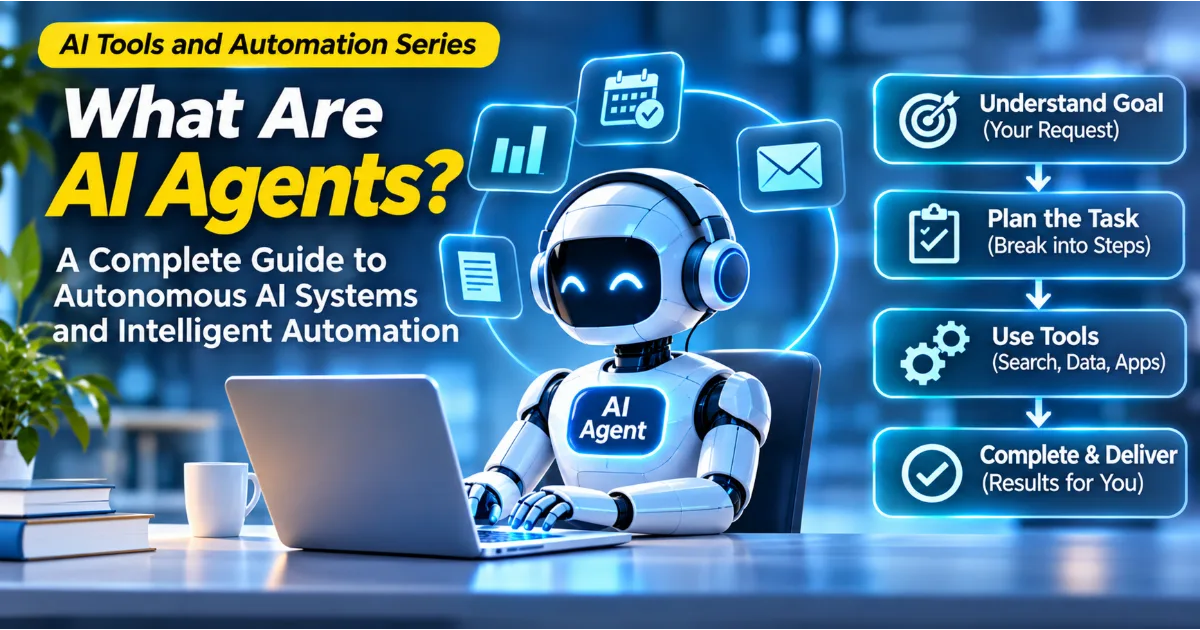
How Do AI Agents Work?
AI agents use a combination of models, instructions, tools, information sources, and control mechanisms.
Their operation can vary significantly, but many agent-based systems follow a common workflow.
1. Receiving a Goal
The process begins when a user or another application provides an objective.
For example, a business owner may instruct an AI agent to prepare a weekly summary of customer enquiries.
The objective should be specific enough for the agent to understand the expected result.
A vague instruction such as "Improve my business" is difficult to execute because it does not define a measurable task.
A more useful instruction might be "Review this week's customer enquiries, group them by topic, identify frequently reported problems, and prepare a summary for the support manager."
2. Understanding the Instructions
The agent interprets the request and identifies the requirements.
It may determine which information sources are needed, which tools are available, and what output format is expected.
A language model can help interpret natural language instructions and convert them into structured steps.
The agent may also identify missing information and ask the user for clarification before proceeding.
3. Planning the Task
Complex tasks often require several actions.
An AI agent may divide the main objective into smaller steps and determine a suitable order.
For example, preparing a customer enquiry report may involve retrieving messages, extracting relevant information, grouping similar questions, counting common topics, and drafting a summary.
Planning helps the agent organise the workflow rather than attempting to complete everything in a single operation.
4. Selecting the Appropriate Tools
An agent may have access to tools that allow it to interact with external systems.
These tools can include search services, databases, APIs, spreadsheets, email applications, calendars, document systems, and internal business software.
For example, an agent preparing a weekly report may need permission to read customer enquiries from an authorised support platform.
The AI model determines which available tool is appropriate for the next step, while the application executes the permitted operation.
5. Taking an Action
After selecting a suitable action, the agent executes it through an available tool or integration.
It may retrieve information, create a document, analyse a dataset, or prepare a draft response.
The action must remain within the permissions granted to the system.
For sensitive operations, such as sending external messages, modifying financial information, or deleting records, human approval may be required.
6. Observing the Result
After an action is completed, the agent receives information about the result.
For example, a search tool may return a list of results, while a database query may return records.
The agent evaluates whether the result is sufficient for the next step.
If information is missing, it may try another permitted approach or ask the user for assistance.
7. Repeating the Process
Some tasks require several cycles of planning, action, and observation.
The agent continues until it reaches the defined objective, encounters a limitation, or requires human intervention.
This repeated process is sometimes described as an agent loop.
8. Delivering the Result
Once the task is complete, the agent provides the output.
The result may be a report, a completed document, a structured dataset, a draft communication, or an update to an approved system.
A good agent should also communicate important limitations, incomplete steps, and actions that require further approval.
The Main Components of an AI Agent
Understanding the architecture of an AI agent helps explain why some systems can perform complex tasks while others are limited to simple conversations.
1. AI Model or Reasoning Engine
The model is responsible for interpreting instructions, understanding context, generating plans, and selecting possible actions.
Many modern AI agents use Large Language Models for these tasks.
The model may analyse a request and determine that it requires information retrieval, calculation, document creation, or interaction with an external application.
The model does not necessarily execute every operation itself. It often decides which tool should be used and processes the resulting information.
2. Instructions and Objectives
An agent needs clear instructions that define its role, responsibilities, boundaries, and expected behaviour.
For example, a customer support agent may be instructed to answer questions using approved company documentation, avoid making unsupported promises, and transfer complicated issues to a human representative.
Clear instructions help reduce ambiguity and make agent behaviour easier to evaluate.
3. Tools
Tools allow agents to interact with their environment.
Without tools, an agent may only be able to generate responses based on the information available in its context.
With suitable tools, it may be able to retrieve current information, perform calculations, update records, or create files.
Tools should be carefully selected because they determine what the agent can actually do.
4. Memory
Memory allows an agent to retain relevant information across different steps or interactions, depending on the system's design.
There are several ways this can work.
Short-term memory may contain the current conversation, task instructions, and recent tool results.
Longer-term memory may store selected preferences, previous decisions, or information that needs to remain available across sessions.
Some systems use databases, document stores, or retrieval mechanisms to access information when required.
Memory should be designed with appropriate privacy controls, retention policies, and access restrictions.
5. Planning and Task Management
Planning allows an agent to divide a complex objective into manageable activities.
A task management component may record which steps have been completed, which remain pending, and whether the workflow has encountered an error.
This is particularly useful when an agent needs to perform multiple operations.
6. Tools and API Integrations
APIs and integrations connect an agent with external applications and services.
For example, a business agent may use an API to retrieve customer information from a CRM system.
Another agent may use a document service to create a report or a calendar integration to identify available meeting times.
These connections must be implemented securely and should follow the access permissions of the connected systems.
7. Guardrails and Safety Controls
Guardrails define what an agent is allowed to do and what actions are restricted.
They may include permission checks, content filters, data validation, approval requirements, and limits on the actions an agent can perform.
For example, an agent may be allowed to draft an email but not send it without approval.
A financial workflow may allow an agent to prepare a payment summary while requiring a human to authorise the transaction.
8. Monitoring and Evaluation
Monitoring helps developers understand whether an agent is behaving as expected.
It may record task completion, tool usage, errors, response quality, execution time, and other relevant information.
Evaluation is important because an agent can fail in several ways. It may misunderstand the objective, select the wrong tool, retrieve irrelevant information, or incorrectly interpret the result.
Regular testing helps identify these problems before the system is used in important workflows.
Different Types of AI Agents
AI agents can be classified in several ways depending on their architecture, decision-making approach, and level of autonomy.
Some classifications are based on traditional Artificial Intelligence concepts, while others describe modern agent-based applications.
1. Simple Reflex Agents
A simple reflex agent selects an action based on the current situation and predefined rules.
It does not necessarily maintain a detailed history of previous interactions.
For example, a basic temperature control system may turn on cooling when the measured temperature exceeds a defined threshold.
Although this example is not necessarily powered by generative AI, it illustrates the concept of an agent that responds to current conditions.
Simple reflex agents work well when the environment and rules are predictable.
2. Model-Based Reflex Agents
A model-based reflex agent maintains an internal representation of the environment.
This helps it make decisions when the current input does not contain all the information needed.
For example, a robotic system may maintain an internal representation of obstacles and previously observed locations.
The internal model helps the system interpret new observations and choose suitable actions.
3. Goal-Based Agents
Goal-based agents select actions according to a desired outcome.
Instead of simply responding to a condition, they consider which actions may help achieve the objective.
For example, a route planning system may evaluate possible routes and select one that reaches a specified destination.
Modern AI agents frequently use goal-oriented task planning.
4. Utility-Based Agents
Utility-based agents evaluate possible actions using a measure of preference or usefulness.
They may compare alternatives based on factors such as time, cost, efficiency, or risk.
For example, a logistics system may evaluate several delivery routes and select one that balances travel time and operating costs.
The quality of the decision depends on how well the utility function represents the actual requirements.
5. Learning Agents
Learning agents improve their behaviour through experience or feedback.
They may use machine learning to identify patterns, adjust strategies, or improve decisions over time.
A recommendation system is one example of software that can learn from user interactions.
Learning agents need appropriate feedback and evaluation because improvement is not guaranteed simply by collecting more data.
6. AI Assistant Agents
AI assistant agents are designed to help users complete personal or professional tasks.
They may support research, writing, scheduling, document management, and information retrieval.
Their level of autonomy depends on the tools they can access and the permissions granted by the user.
7. Tool-Using AI Agents
Tool-using agents can interact with external services and applications.
For example, an agent may use a search tool to retrieve information, a calculator to perform numerical operations, and a document tool to prepare a report.
The agent selects tools according to the task and available instructions.
8. Multi-Agent Systems
A multi-agent system contains multiple agents that cooperate, communicate, or coordinate to solve a larger problem.
Each agent may have a specialised responsibility.
For example, a research workflow could use one agent to gather information, another to organise findings, and another to prepare a draft report.
However, multiple agents do not automatically produce better results. Coordination, communication, accuracy, and additional computing costs must be considered.
What Is the Difference Between AI Automation and AI Agents?
Automation and AI agents are closely related, but they are not identical.
Traditional automation usually follows a predefined sequence of steps.
For example, an automation workflow may receive a form submission, add the information to a spreadsheet, send a confirmation email, and notify a team member.
The sequence is established in advance. The workflow performs the configured actions when the required conditions are met.
An AI agent can be designed to make decisions about what to do next based on the information it receives.
Consider a customer support workflow.
A traditional automation system may send a standard confirmation email whenever a customer submits a request.
An AI agent may analyse the message, identify the topic, retrieve relevant documentation, prepare a response, and determine whether the issue should be escalated.
The distinction is flexibility.
Traditional automation is generally more predictable when the process is clearly defined. AI agents are useful when a task involves variable information, interpretation, and decisions.
In practice, the two approaches often work together. A business may use conventional automation to handle reliable, repetitive steps and AI agents to manage tasks requiring language understanding or flexible decision-making.
What Are Multi-Agent Systems?
A multi-agent system uses multiple agents to work towards a shared objective or related objectives.
Each agent may have a specialised role, access to particular tools, and responsibility for a specific part of the workflow.
Imagine a company preparing a market research report.
A research agent may gather information from approved sources.
An analysis agent may organise the collected data and identify patterns.
A writing agent may prepare the report.
A review agent may check whether the final document follows the required structure and includes supporting information.
The agents may exchange results through a shared workflow or communication mechanism.
This approach can make complex tasks easier to organise because each agent has a more specific responsibility.
However, multi-agent systems introduce additional challenges. Agents may misunderstand each other's outputs, repeat work, produce conflicting conclusions, or consume unnecessary resources.
The workflow needs clear responsibilities, shared information structures, evaluation procedures, and a mechanism for resolving disagreements.
For many business applications, a single agent with well-designed tools is sufficient. Multiple agents should be introduced only when their specialised roles provide a clear advantage.
Real-World Applications of AI Agents
AI agents are being explored across several industries. Their practical value depends on the complexity of the task, the quality of connected information, and the level of control available.
1. Customer Support
Customer support is one of the most visible applications of AI agents.
A customer support agent may receive a question, understand the issue, search approved knowledge sources, and prepare a response.
For example, a customer may ask how to update an account detail.
The agent can retrieve the relevant instructions and guide the customer through the process.
If the request involves account ownership, payment disputes, or other sensitive issues, the system can transfer the conversation to a human representative.
This approach can help businesses handle common enquiries more efficiently while allowing employees to focus on complex cases.
2. Sales and Lead Research
Sales teams spend considerable time identifying potential customers, researching companies, and preparing outreach.
An AI agent may help gather information from approved sources, organise prospects according to predefined criteria, and prepare initial research summaries.
For example, a business may ask an agent to identify companies in a particular industry and location.
The agent can collect publicly available company information, organise the findings, and prepare a list for sales representatives to review.
It should not invent contact details or send unsolicited messages without appropriate authorisation and compliance checks.
3. Marketing Operations
Marketing teams manage content calendars, campaign planning, audience research, and performance reporting.
An AI agent may help organise these activities.
It could analyse approved campaign data, summarise performance, identify content themes, and prepare draft social media posts.
A human marketer can review the recommendations and approve content before publication.
Agents can also help coordinate repetitive marketing workflows when connected to suitable publishing and analytics tools.
4. Software Development
AI agents can support software engineering by examining code, identifying potential issues, preparing test cases, and helping implement clearly defined changes.
For example, a developer may ask an agent to investigate a reported bug.
The agent may examine relevant files, trace the affected functionality, propose a correction, and prepare tests.
However, generated code must be reviewed and tested. Agents should not receive unrestricted access to production systems or sensitive credentials.
5. Data Analysis
An AI data analysis agent may receive a question about a business dataset and determine which calculations or queries are required.
For example, a manager may ask for a comparison of monthly sales performance.
The agent may retrieve authorised data, calculate relevant metrics, create a summary, and explain important patterns.
Numerical results should be checked against the original data and calculation logic before being used for important decisions.
6. Human Resources
HR agents may help organise recruitment information, prepare interview schedules, answer employee questions, and summarise authorised policy documents.
For example, an employee may ask about the company's leave application process.
An agent connected to approved HR documentation can retrieve the relevant policy and explain the steps.
Employment decisions should remain subject to appropriate human oversight and fair processes.
7. Finance and Accounting
AI agents can assist with selected financial administration tasks.
They may organise invoices, identify missing information, prepare expense summaries, or retrieve relevant accounting documentation.
An agent may help flag unusual transactions for review, but it should not independently make high-impact financial decisions without appropriate controls.
Financial records require accuracy, confidentiality, auditability, and clear accountability.
8. E-Commerce and Retail
An e-commerce agent may help customers find products, compare available options, answer questions, and retrieve order information.
A customer might ask for a product suitable for a particular requirement.
The agent can search the authorised product catalogue and present relevant options.
Another agent may help retailers analyse product enquiries and organise inventory information.
Pricing, availability, refunds, and order changes should be verified through the actual business systems.
9. Research and Knowledge Management
Research agents can help users search approved sources, collect relevant information, organise findings, and prepare structured summaries.
An organisation may use an internal knowledge agent to answer employee questions using authorised documentation.
A reliable system should distinguish retrieved facts from generated explanations and provide references to original information whenever possible.
10. Project Management
Project management agents can help track tasks, prepare status summaries, identify overdue work, and organise project information.
For example, an agent may examine an approved project tracker and prepare a weekly progress report.
It can identify incomplete tasks and highlight dependencies that require attention.
However, project owners remain responsible for priorities, deadlines, and important decisions.
11. Personal Productivity
Personal productivity agents can assist with organising information, drafting documents, preparing schedules, and managing selected digital workflows.
For example, a user may ask an agent to organise meeting notes into action items.
The agent may identify tasks, group them by topic, and prepare a draft task list.
Actions that affect calendars, communications, or external accounts should follow the user's permissions and approval requirements.
12. IT Operations
IT operations agents can assist with monitoring alerts, summarising system logs, classifying support tickets, and suggesting troubleshooting steps.
An agent may examine an error report and retrieve relevant internal documentation.
It can prepare recommendations for an engineer to review.
Actions such as restarting critical services, changing network settings, or modifying production infrastructure require carefully controlled permissions and testing.
How Businesses Can Build an AI Agent
Building an AI agent begins with identifying a real problem rather than selecting a model or tool first.
A successful implementation should have a clearly defined objective, reliable information sources, suitable integrations, and measurable results.
Step 1: Identify a Suitable Business Task
Start with a process that involves repeated information gathering, interpretation, or decision support.
Examples include preparing reports, answering common support questions, organising enquiries, or summarising documents.
Avoid beginning with a task that requires unrestricted access to sensitive systems or high-impact autonomous decisions.
Step 2: Define the Expected Outcome
Describe what the agent should accomplish.
For example, an agent may be responsible for preparing a weekly summary of customer enquiries.
Define the required output, acceptable sources, completion conditions, and situations that require human assistance.
Step 3: Select an AI Model
Choose a model that can handle the task.
A language model may be suitable for document analysis and communication. A multimodal model may be useful when the workflow involves images or audio.
The choice should consider performance, cost, privacy, integration requirements, and reliability.
Step 4: Identify the Required Tools
Determine which applications the agent needs to access.
A reporting agent may require access to a database and document creation tool.
A support agent may need an authorised knowledge base and customer support platform.
Give the agent only the permissions necessary for its responsibilities.
Step 5: Connect Reliable Information Sources
An agent is only as useful as the information it can access.
Connect it to relevant and authorised documents, databases, APIs, or business applications.
Establish how the information is updated and how the system should handle missing or conflicting data.
Step 6: Define Instructions and Guardrails
Write clear instructions describing the agent's responsibilities and limitations.
For example, a support agent may be instructed to use approved documentation, avoid inventing policies, and escalate uncertain cases.
Set restrictions on data access and external actions.
Step 7: Build the Workflow
Organise the steps the agent should follow.
A simple workflow may include receiving a request, retrieving information, analysing the result, preparing an output, and asking for approval.
Include error handling and a clear way to stop or escalate the task.
Step 8: Test with Realistic Scenarios
Test the agent using normal requests, incomplete information, unusual situations, and incorrect inputs.
Measure whether it completes the task accurately and whether it follows the defined restrictions.
Testing should include attempts to make the agent perform actions outside its intended scope.
Step 9: Deploy with Human Oversight
Begin with a limited deployment.
Allow employees to review the agent's work before expanding its responsibilities.
Monitor its performance and adjust the instructions, tools, and workflow when necessary.
Step 10: Measure Business Value
Evaluate the system using measurable indicators.
These may include task completion rate, response time, error frequency, employee time saved, operating cost, and user satisfaction.
An AI agent should be considered successful when it improves a meaningful business process, not simply because it uses an advanced AI model.
Popular AI Agent Frameworks and Development Tools
Developers can use several frameworks and platforms to build agent-based applications. Their features and supported integrations change over time, so the appropriate choice depends on the project.
LangChain
LangChain provides tools for building applications that connect language models with external data sources and tools.
It can be used to develop workflows involving retrieval, tool usage, and agent-like behaviour.
LangGraph
LangGraph supports the development of stateful, multi-step AI workflows.
It is useful when developers need more control over execution, state management, branching, and human approval.
AutoGen
AutoGen is a framework associated with building applications in which multiple AI agents can communicate and collaborate.
It can be used to experiment with multi-agent workflows.
CrewAI
CrewAI provides an approach to organising multiple agents around specialised roles and tasks.
Developers can use it to explore workflows in which different agents contribute to a shared objective.
Semantic Kernel
Semantic Kernel provides capabilities for connecting AI models with application functions and other software components.
It can support the integration of AI capabilities into existing applications.
OpenAI APIs and Agent Development Tools
OpenAI provides model and developer capabilities that can be used to build AI-powered applications, including workflows involving tools and external systems.
Developers should consult current documentation to understand available models, supported tools, security requirements, and implementation patterns.
Frameworks are useful, but they do not automatically make an agent reliable. Good architecture, testing, permission management, and monitoring remain essential.
What Is Human-in-the-Loop AI?
Human-in-the-loop AI refers to systems in which people participate in reviewing, approving, correcting, or guiding AI operations.
This is especially important for agents that interact with external systems.
Consider an agent preparing customer emails.
It may analyse an enquiry, retrieve the relevant information, and draft a response.
Instead of sending the message immediately, it presents the draft to a support employee.
The employee reviews the content and approves or edits it before sending.
This arrangement allows the agent to handle repetitive preparation while preserving human responsibility for the final communication.
Human review is particularly important when tasks involve financial transactions, personal information, legal obligations, healthcare, employment, or other consequential decisions.
Advantages of AI Agents
AI agents offer several potential benefits when they are designed for appropriate tasks.
1. Automation of Multi-Step Workflows
Traditional automation often follows fixed sequences. Agents can help manage tasks in which the next step depends on the information discovered during the process.
2. Reduced Repetitive Work
Agents can assist with repeated activities such as gathering information, preparing summaries, organising documents, and drafting responses.
This can reduce manual effort for employees.
3. Faster Information Processing
Agents can retrieve and organise information from connected sources more quickly than many manual workflows.
The actual speed depends on system complexity, data quality, and available infrastructure.
4. Improved Workflow Coordination
Agents can help connect different tools and applications.
A workflow may retrieve information from one system, analyse it, and prepare an output in another.
5. Support for Decision-Making
Agents can organise relevant information and prepare comparisons that help people evaluate options.
They should support decisions rather than automatically replace accountable decision-makers.
6. Flexible Task Handling
Unlike strictly rule-based scripts, AI agents can interpret different forms of natural language instructions and adapt their actions within defined limits.
7. Scalable Assistance
Businesses may use agents to support larger volumes of routine tasks, provided that the system has sufficient capacity and appropriate controls.
Limitations and Risks of AI Agents
AI agents introduce challenges beyond those associated with ordinary AI chatbots because they can take actions.
1. Incorrect Decisions
An agent may misunderstand instructions, misinterpret information, or select an unsuitable action.
If the system can modify external records, incorrect decisions may have practical consequences.
2. Hallucinations
Agents that use language models can generate unsupported information.
They may also misinterpret tool results or present assumptions as facts.
Important outputs should be checked against reliable sources.
3. Excessive Autonomy
Giving an agent too much authority can create unnecessary risks.
An agent should not automatically receive unrestricted access to email accounts, financial systems, production databases, or sensitive records.
Permissions should be limited to what the task requires.
4. Tool Execution Errors
An agent may select the wrong tool, provide incorrect parameters, or misunderstand the result returned by an application.
Tool calls should be validated and monitored.
5. Security Vulnerabilities
Agents may encounter malicious instructions in emails, documents, web pages, or other external information.
These instructions may attempt to manipulate the agent into revealing data or performing unauthorised actions.
This is one reason external content should be treated as untrusted information rather than as authoritative instructions.
6. Data Privacy
Agents may process personal, financial, customer, or business information.
Organisations need suitable access controls, encryption, data retention policies, and security reviews.
7. Unpredictable Costs
An agent may perform multiple model requests and tool operations during a single task.
Complex workflows can therefore consume more resources than expected.
Developers should establish limits on execution time, model usage, and the number of permitted actions.
8. Difficult Evaluation
A simple automation can often be tested by checking whether each predefined step executed correctly.
Agent behaviour can be more variable because the system may choose different actions for similar requests.
Evaluation should cover both final results and the process used to produce them.
9. Integration Complexity
Connecting agents to existing business applications can require significant engineering effort.
Different systems may use different data structures, access policies, and APIs.
10. Accountability
When an agent performs an action, organisations need to know who authorised it, which information was used, and how the result can be reviewed.
Clear ownership and audit records are essential.
Best Practices for Using AI Agents Responsibly
A responsible AI agent implementation should begin with limited permissions and a clearly defined purpose.
The system should have access only to the information and tools necessary for its assigned task.
Developers should introduce approval requirements for sensitive operations and establish clear escalation paths when an agent is uncertain.
External data should be validated, and the system should be designed to distinguish between verified information, generated content, and assumptions.
Organisations should monitor agent activity and maintain records of important operations.
Regular security testing is necessary, particularly when agents can interact with websites, documents, email, databases, or other external services.
Users should also be informed when they are interacting with an AI-powered system where that disclosure is appropriate or required.
Most importantly, the level of autonomy should match the consequences of the task. A system preparing an internal research summary can be given more operational flexibility than one authorised to transfer money or modify critical infrastructure.
The Future of AI Agents
AI agents are expected to become increasingly important as Artificial Intelligence moves from conversational applications towards systems that can interact with digital environments.
One important direction is the development of agents that can operate across multiple applications.
Instead of switching between separate tools, a user may be able to describe an objective and allow an authorised agent to coordinate the required workflow.
Another direction is multimodal interaction. Agents may increasingly work with text, images, audio, video, and structured information within a single task.
This could support workflows such as examining a product photograph, retrieving its specifications, and preparing a report.
Multi-agent systems may also become more specialised. Different agents could focus on research, analysis, quality checking, and communication.
However, coordinating these systems reliably will remain an important engineering challenge.
Another development is the integration of AI agents with robotics and physical environments. Such systems may combine visual perception, planning, and physical actions to perform tasks in warehouses, factories, and other controlled environments.
The future will also depend on better security, evaluation, and governance. As agents gain access to more tools and information, organisations will need stronger methods for controlling permissions and understanding their actions.
AI agents are unlikely to make every business process fully autonomous. Many workflows will continue to combine AI assistance, traditional automation, and human decision-making.
The most successful systems will probably be those that solve clearly defined problems while remaining reliable, secure, and accountable.
Conclusion: AI Agents Are Taking Artificial Intelligence Beyond Conversations
AI agents represent an important development in the evolution of Artificial Intelligence.
They can interpret objectives, plan activities, use tools, retrieve information, and perform multiple actions towards a defined goal.
Unlike systems that only generate a response, agent-based applications can participate in broader workflows involving research, analysis, communication, and software interaction.
They can support customer service, marketing, sales research, software development, data analysis, project management, and business operations.
However, their capabilities depend on their design, available tools, information quality, and permissions. They can make mistakes, encounter security risks, and take incorrect actions if they are not properly controlled.
Businesses should begin with clearly defined tasks, limited access, reliable information sources, measurable objectives, and human approval for sensitive operations.
For developers, learning about Large Language Models, APIs, tool integration, workflow design, memory, and evaluation provides a practical foundation for building agent-based applications.
AI agents are changing how people think about automation. Instead of programming every step in advance, developers can create systems that interpret objectives and select appropriate actions within controlled boundaries.
The opportunity is not simply to make software more autonomous. It is to make digital workflows more useful, flexible, and efficient while keeping people responsible for important decisions.
Continue the Discussion
Where do you think AI agents will have the biggest impact: customer support, software development, sales, marketing, research, or everyday business operations?
Would you trust an AI agent to complete a multi-step task on your behalf if you could review its actions and control its permissions?
Share your thoughts and experiences as we continue exploring the technologies shaping the future of AI and automation.
#AIAgents #ArtificialIntelligence #AIAutomation #AgenticAI #AITools