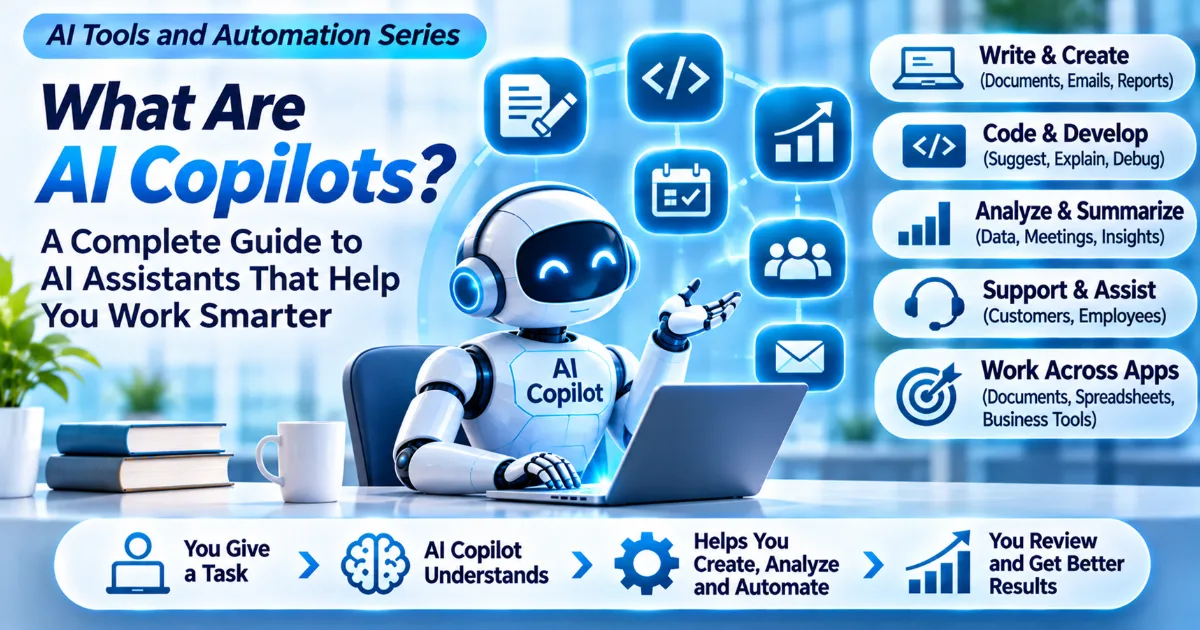
Artificial intelligence is gradually becoming part of the tools people use every day. From writing emails and preparing reports to analysing information, generating code, and managing business activities, AI is changing how individuals and organizations approach their work.
One development attracting considerable attention is the rise of AI copilots. These intelligent assistants are designed to work alongside people, helping them complete tasks, understand information, generate ideas, and improve productivity without necessarily taking complete control of the process.
You may have encountered an AI assistant that helps write documents, suggests improvements while coding, summarizes meetings, creates spreadsheet formulas, or answers questions about business information. These are examples of how AI copilots are being integrated into everyday software.
The word copilot is important because it describes the intended relationship between humans and AI. A copilot assists, recommends, and supports. The human user generally remains responsible for directing the work, reviewing important outputs, and making decisions that require judgment.
Unlike traditional software, which usually waits for users to select commands and perform specific operations, an AI copilot can interpret natural-language instructions and provide assistance based on the task being performed. It may understand the content of a document, suggest changes, generate a first draft, or help users navigate a complicated workflow.
Continue Reading
For businesses, AI copilots can support employees across departments such as marketing, finance, customer support, sales, human resources, software development, and operations. For individuals, they can act as learning assistants, writing partners, research helpers, and productivity tools.
However, AI copilots are not perfect. They can misunderstand instructions, generate inaccurate information, overlook important context, and make recommendations that require human verification. Their usefulness depends on the quality of the AI model, the information available to it, the software environment, and the way people use them.
Understanding AI copilots is therefore important for anyone interested in the future of work, intelligent software, and practical applications of artificial intelligence.
What Is an AI Copilot?
An AI copilot is an artificial intelligence-powered assistant designed to support a person while they perform a task or use a software application.
It can understand instructions, analyse information, generate content, provide suggestions, answer questions, and assist with different activities within a particular environment.
The term is commonly used for AI assistants integrated into productivity applications, development environments, business platforms, customer service systems, and other software products.
For example, imagine writing a professional report. A traditional word processor allows you to type, format, edit, and organize your document. An AI copilot integrated into that environment may also help you create an outline, rewrite a paragraph, summarize information, improve grammar, or adjust the tone.
The user does not have to perform every step independently. They can describe what they need, review the suggestions, and decide which changes to accept.
Similarly, a software developer working in a code editor may receive suggestions for completing functions, identifying errors, generating tests, or explaining unfamiliar code.
An AI copilot therefore adds an intelligent assistance layer to an existing task or application.
It is important to understand that not every AI chatbot is necessarily an AI copilot. A general chatbot may operate independently as a conversational interface, while a copilot is often designed to support a particular workflow, application, or professional activity.
Why Are AI Copilots Becoming Important?
Modern work involves large amounts of information and frequent movement between different applications.
Employees may spend their time reading messages, preparing documents, attending meetings, updating spreadsheets, searching for information, writing reports, and coordinating with colleagues.
Although many of these activities are necessary, they can consume significant time.
AI copilots attempt to reduce this burden by making assistance available within the tools people already use.
Consider a project manager preparing a weekly project update. The process may involve reviewing task records, reading team messages, checking deadlines, identifying delays, and preparing a report.
An AI copilot connected to approved project information may help summarize progress, identify outstanding tasks, draft the update, and highlight possible risks. The project manager can then verify the information and finalize the report.
This does not eliminate the need for project management skills. Instead, it reduces some of the effort required to collect and organize information.
Several developments have contributed to the growing importance of AI copilots.
First, modern language models have become better at understanding natural-language instructions and generating useful responses.
Second, software companies are integrating AI capabilities directly into applications rather than requiring users to open separate AI tools.
Third, organizations are looking for practical ways to improve productivity without completely redesigning their existing systems.
Finally, AI models can now work with different types of information, including text, images, documents, code, and audio, depending on the platform.
Together, these developments are making AI assistance more accessible to everyday users.
How Does an AI Copilot Work?
An AI copilot combines an AI model with instructions, contextual information, and application capabilities. The exact architecture varies between products, but most copilots follow a similar process.
1. Receiving the User's Request
The process begins when a user provides an instruction or asks a question.
The request may be typed into a chat interface, selected from a menu, entered through voice input, or initiated through an action inside an application.
For example, a user working with a spreadsheet may ask:
"Summarize the sales performance for the previous quarter and identify the products with the largest revenue changes."
The copilot receives the instruction and determines what the user is asking it to accomplish.
2. Understanding the Context
The copilot needs relevant information to produce a useful response.
Depending on the application and permissions, this context may include the currently open document, spreadsheet data, code, conversation history, connected files, or information retrieved from approved sources.
For example, a copilot working inside a spreadsheet may use the available columns and records to understand which figures are relevant to the user's request.
A general AI assistant without access to the spreadsheet cannot reliably analyse its actual contents unless the data is provided.
Context is therefore one of the most important elements of an AI copilot.
3. Processing the Request
The AI model interprets the instruction and determines the type of response or assistance required.
It may generate text, summarize information, classify content, write code, explain a concept, or identify the next step in a workflow.
Some copilots can also select tools or application functions to complete specific tasks.
4. Generating Suggestions or Actions
The copilot produces an output based on the request and available context.
This may be a paragraph, a formula, a code suggestion, a report, a summary, or a recommended action.
For example, a writing copilot may suggest a clearer version of a paragraph, while a coding copilot may generate a function based on the surrounding code.
Depending on the application, the user may receive suggestions that can be accepted, rejected, or edited.
5. Human Review and Approval
The user evaluates the result and decides whether it should be used.
This is particularly important when the output involves business decisions, financial information, customer communication, software changes, or other activities where mistakes can have consequences.
Human review helps ensure that the AI-generated output meets the actual requirements.
6. Refinement Through Follow-Up Instructions
AI copilots often support multiple interactions.
A user can ask the system to shorten an answer, explain a calculation, change the writing style, add missing information, or generate an alternative.
This makes the interaction more collaborative than a traditional software command.
The Main Components of an AI Copilot
Although AI copilots can have different architectures, several components are commonly involved.
Artificial Intelligence Model
The AI model provides the intelligence required to understand instructions and generate responses.
Many modern copilots use large language models for language understanding, content generation, summarization, and reasoning-related tasks.
Some applications also use specialized models for image recognition, speech processing, predictions, or other functions.
User Interface
The user interface provides the way people interact with the copilot.
It may appear as a chat window, a sidebar, a floating assistant, an inline suggestion, or a voice interface.
A well-designed interface allows users to request assistance without interrupting their existing workflow unnecessarily.
Context Management
Context management determines what information is supplied to the AI model.
This may include the current document, application data, user instructions, conversation history, and retrieved knowledge.
The system must select relevant information while respecting access permissions and data privacy requirements.
Prompt and Instruction Layer
Instructions guide the copilot's behaviour.
They may define the assistant's purpose, communication style, supported tasks, limitations, and expected output formats.
For example, a customer support copilot may be instructed to use approved product documentation, avoid making unsupported promises, and escalate sensitive issues.
Tool and Application Integrations
Some copilots can interact with external services or functions.
These integrations may allow the assistant to retrieve records, create tasks, generate documents, update information, or perform other authorized operations.
The available actions depend on the application and its permissions.
Security and Permission Controls
An AI copilot should only access information and perform actions that it is authorized to handle.
Permission systems help restrict access to sensitive data and prevent inappropriate operations.
Organizations should also consider logging, monitoring, approval requirements, and data retention policies.
Different Types of AI Copilots
AI copilots are not limited to one type of software. They are increasingly being developed for different professional activities and everyday tasks.
1. Writing and Productivity Copilots
Writing copilots assist with creating, editing, summarizing, and improving written content.
They can help prepare emails, reports, proposals, presentations, meeting notes, and other documents.
For example, an employee may provide a few points from a meeting and ask the copilot to turn them into a structured summary with decisions and action items.
The employee can then review the draft and make necessary corrections.
These copilots are useful for professionals who spend a significant amount of time preparing written communication.
2. Coding Copilots
Coding copilots assist software developers while they write and maintain code.
They may suggest code completions, explain functions, generate tests, identify potential errors, and help developers understand unfamiliar programming concepts.
For example, a developer writing a Python application may request a function that validates email addresses and handles invalid input.
The coding copilot can generate a suggested implementation, which the developer can review and test.
Coding copilots can improve development productivity, but generated code may contain bugs, insecure patterns, or incorrect assumptions. It should never be treated as automatically production-ready.
3. Business Copilots
Business copilots help employees work with organizational information and business applications.
They may assist with preparing reports, summarizing meetings, analysing spreadsheets, drafting business communication, and retrieving information from approved company sources.
For example, a business analyst may ask a copilot to summarize the main changes in a monthly performance report.
The usefulness of the result depends on the quality of the underlying data and whether the copilot has access to the relevant information.
4. Customer Service Copilots
Customer service copilots assist support representatives by retrieving information, suggesting responses, summarizing conversations, and identifying possible next steps.
They can help employees locate product documentation and respond consistently to common questions.
For example, when a customer reports a technical problem, the copilot may summarize the issue, retrieve relevant troubleshooting instructions, and prepare a response for the support representative.
This approach can support faster customer service while allowing employees to manage complicated cases.
5. Sales Copilots
Sales copilots help sales professionals prepare for customer interactions and manage sales activities.
They may summarize customer conversations, draft follow-up emails, organize meeting notes, and help identify relevant information about potential customers.
For example, after a product demonstration, a sales representative may use a copilot to prepare a meeting summary and identify the questions that still need answers.
6. Marketing Copilots
Marketing copilots assist with campaign planning, content creation, audience research, and performance analysis.
They can generate content ideas, prepare draft advertisements, summarize campaign results, and suggest possible improvements.
For example, a marketing professional may ask a copilot to create three versions of a campaign message for different customer segments.
The marketing team remains responsible for reviewing brand accuracy, factual claims, and campaign suitability.
7. Data Analysis Copilots
Data analysis copilots help users explore information and understand patterns.
They may explain spreadsheet formulas, summarize trends, generate queries, create visualizations, and prepare analytical reports.
For example, a business owner may ask a copilot to compare monthly sales figures and identify products that experienced a significant decline.
The user should verify the calculations and confirm that the analysis uses the correct data.
8. Learning and Education Copilots
Educational copilots help students and teachers with explanations, practice questions, learning materials, and administrative tasks.
A student learning programming may ask the copilot to explain a concept using a simple example. A teacher may use it to prepare lesson outlines or generate practice exercises.
Educational copilots can support personalized learning, but students should develop their own understanding rather than relying entirely on generated answers.
Popular AI Copilots and Their Applications
Several technology companies have introduced AI copilots or assistants designed for particular environments.
Microsoft Copilot
Provides AI assistance across supported Microsoft products and services. Depending on the product and subscription, it can help with writing, summarization, analysis, and productivity workflows.
GitHub Copilot
Assists developers with code suggestions, explanations, and supported development workflows inside compatible development environments.
Google Gemini
Supports AI assistance across Google's supported products and services, including writing, information processing, and productivity activities.
Amazon Q Developer
Provides AI assistance for software development and supported AWS-related tasks, helping developers work with code and cloud environments.
Salesforce AI
Provides AI capabilities within supported Salesforce products and workflows to assist with customer information, sales activities, and business processes.
Atlassian Rovo
Helps users discover information and work across supported Atlassian products and connected knowledge sources.
These products have different capabilities, integrations, access requirements, and pricing models. Some are designed for general productivity, while others focus on software development or specific business environments.
AI Copilots vs AI Chatbots
AI copilots and AI chatbots both use artificial intelligence to interact with users, but their purposes and integration levels can differ.
A chatbot generally provides a conversational interface through which users ask questions and receive responses.
An AI copilot is often designed to assist with a particular activity inside an application or workflow. It may use the surrounding context and provide suggestions directly where the user is working.
For example, a general chatbot can explain how to create a spreadsheet formula. A spreadsheet copilot may help generate that formula using the data and columns in the currently open spreadsheet, if it has the required access.
Comparison | AI chatbot | AI copilot |
|---|---|---|
Primary purpose | Conversation and information assistance | Support a specific task or workflow |
Context | Conversation and supplied information | May include application and task context |
Integration | Often operates through a chat interface | Often embedded in software |
Assistance | Answers questions and generates content | Suggests, creates, analyses, and assists with actions |
Human role | Directs the conversation | Directs and reviews the work |
Example | General AI question-answering assistant | Coding or productivity assistant |
The distinction is not absolute. Some AI chatbots have tool integrations, and some copilots use conversational interfaces. The terms describe common product approaches rather than completely separate technical categories.
AI Copilots vs AI Agents
AI copilots and AI agents are closely related, but they often differ in how much independence they have when completing tasks.
An AI copilot is generally designed to assist a person while the person remains actively involved in directing and reviewing the work.
An AI agent is designed to pursue a goal by carrying out a sequence of steps, using tools and evaluating results within its permitted environment.
Consider a travel planning application.
A copilot may help a user compare destinations, organize travel information, and prepare an itinerary.
An AI agent may be able to search available options, compare them against the user's requirements, and perform authorized actions through connected services.
The exact capabilities vary, and not every product fits neatly into one category.
Area | AI copilot | AI agent |
|---|---|---|
Main role | Assists a human user | Pursues a defined goal |
Human involvement | Usually frequent | May be less frequent during execution |
Task handling | Often provides suggestions and support | May perform multiple connected steps |
Decision-making | Commonly user-directed | Can make bounded decisions |
Actions | May suggest or execute approved actions | May select and execute authorized tools |
Example | Helps draft an email | Prepares and sends an approved email workflow |
In practice, copilots and agents can overlap. Some copilots include agent-like capabilities, while some agents are designed to work under continuous human supervision.
AI Copilots vs Traditional Software Assistants
Traditional software assistants often operate through fixed menus, predefined commands, and simple rules.
An AI copilot can interpret natural-language instructions and work with information in more flexible ways.
Imagine using a traditional spreadsheet application. You may need to understand formulas, select ranges, configure charts, and manually prepare a report.
With an AI copilot, you may be able to describe the required analysis in natural language. The assistant can suggest formulas, explain trends, or prepare a chart, depending on its capabilities and permissions.
This does not mean traditional software is becoming unnecessary. Structured interfaces remain important because they provide predictable controls, precise operations, and transparent workflows.
AI copilots add another way to interact with software rather than replacing every existing feature.
Real-World Applications of AI Copilots
AI copilots can assist with a wide range of professional activities.
1. Software Development
Developers often spend time reading documentation, writing repetitive code, investigating bugs, preparing tests, and understanding unfamiliar codebases.
A coding copilot can assist by generating code suggestions, explaining functions, identifying potential errors, and helping prepare documentation.
For example, a developer working on a web application may ask the copilot to explain how a particular API endpoint works. If the relevant code is available in context, the assistant can provide an explanation and suggest improvements.
Developers must still review the code, run tests, and consider security and performance requirements.
2. Business Reporting
Business analysts and managers regularly prepare reports based on information from spreadsheets, databases, and business applications.
An AI copilot may summarize data, identify important changes, generate draft explanations, and help prepare presentation material.
For example, a sales manager may ask the copilot to summarize the quarterly sales performance and highlight the regions with the largest changes.
The manager should verify the figures and ensure that the explanation reflects the actual business situation.
3. Meeting Assistance
Meetings generate large amounts of information, including discussions, decisions, questions, and action items.
An AI copilot can help transcribe supported meetings, summarize conversations, identify important topics, and prepare follow-up notes.
For example, after a project meeting, an assistant may prepare a summary of completed work, unresolved issues, and proposed next steps.
Participants should review important decisions and confirm action owners before treating the generated notes as an official record.
4. Customer Support
Customer service representatives need to understand customer problems, retrieve product information, and prepare suitable responses.
An AI copilot can help summarize conversations, suggest relevant support documentation, and draft responses.
For example, when a customer reports a payment issue, the copilot may help the representative locate the relevant troubleshooting procedure and prepare a clear explanation.
Sensitive customer actions should remain subject to the company's policies and approval requirements.
5. Marketing and Content Creation
Marketing professionals work with campaigns, advertisements, articles, social media content, audience research, and performance reports.
An AI copilot can assist with brainstorming, drafting, rewriting, summarizing, and adapting content for different channels.
For example, a marketing team may provide a campaign objective and ask the copilot to prepare several content ideas for different audience segments.
The team remains responsible for originality, brand voice, accuracy, and the final publishing decision.
6. Finance and Accounting
Finance professionals handle reports, spreadsheets, invoices, budgets, and financial records.
AI copilots can help explain formulas, summarize financial information, prepare draft reports, and identify unusual patterns for further investigation.
However, financial calculations, accounting entries, tax-related decisions, and payment instructions require careful verification.
7. Human Resources
HR teams manage recruitment, employee communication, policy documentation, onboarding, and administrative records.
An AI copilot can assist with drafting job descriptions, preparing interview questions, summarizing policies, and generating onboarding materials.
Sensitive employment decisions should not be delegated blindly to AI systems. Human oversight and appropriate fairness controls remain essential.
8. Education and Learning
Students can use AI copilots to understand difficult topics, receive explanations, practise problems, and organize study materials.
Teachers can use them to prepare lesson outlines, generate examples, create revision questions, and organize educational resources.
For instance, a student learning machine learning may ask a copilot to explain supervised learning using a practical example from everyday life.
The goal should be to improve understanding, not replace independent thinking.
Benefits of AI Copilots
AI copilots can provide several benefits when their capabilities are matched to appropriate tasks.
Increased Productivity
Copilots can help reduce the time spent on drafting, summarizing, searching, organizing, and other repetitive activities.
This allows users to spend more time reviewing results and working on tasks that require human judgment.
Easier Access to Information
Users do not always know which menu, function, or document contains the information they need.
A copilot that can access approved application context may help locate relevant information through natural-language questions.
Support for Non-Technical Users
Some software applications require specialized knowledge.
AI copilots can make certain tasks easier by allowing users to describe what they want in ordinary language.
For example, a spreadsheet user may request help with a formula without knowing the exact syntax.
Improved Writing and Communication
Copilots can help users prepare professional emails, reports, summaries, and presentations.
They can also suggest alternative wording and help adjust communication for different audiences.
Assistance with Learning
Users can ask follow-up questions, request examples, and explore unfamiliar topics.
This makes AI copilots useful as learning assistants, especially when explanations are reviewed against reliable sources.
Better Workflow Support
When connected to approved tools, copilots can help users move between information and actions more efficiently.
For example, an assistant may summarize a meeting and help prepare follow-up tasks within a supported project management environment.
Limitations and Risks of AI Copilots
Despite their benefits, AI copilots have limitations that users and organizations must understand.
Inaccurate Information
AI models can generate incorrect answers, misunderstand context, or provide outdated information.
An answer may sound confident and professional even when it is wrong.
Users should verify important facts, calculations, technical recommendations, and business decisions.
Limited Context
A copilot may not have access to every document, conversation, database, or application record relevant to a task.
If important information is missing, its response may be incomplete.
Users should understand what information the assistant can actually access.
Privacy and Confidentiality
Some AI copilots process information through external services or connected business systems.
Organizations must understand how data is handled and ensure that employees follow approved security and privacy policies.
Sensitive information should not be shared with an AI service unless its use has been authorized.
Overdependence
Relying entirely on AI-generated suggestions can weaken independent evaluation.
Employees should continue developing their professional skills and understanding the work they are performing.
Bias and Fairness
AI models may reproduce biases present in their training data or supplied information.
This is particularly important in recruitment, financial services, education, and other areas involving people and consequential decisions.
Organizations should evaluate AI outputs for unfair patterns and maintain suitable oversight.
Integration Challenges
An AI copilot may need access to documents, databases, software applications, and internal services.
Integrating these systems can require technical work, security reviews, and ongoing maintenance.
Cost and Availability
AI copilot features may depend on subscriptions, usage limits, software licenses, or specific product plans.
Businesses should compare costs with the expected benefits before adopting them widely.
How to Choose the Right AI Copilot
Choosing an AI copilot should begin with understanding the problem you want to solve.
A developer may need coding assistance, while a business manager may need help with reports and communication. A marketing professional may prioritize content generation and campaign analysis.
The right product is the one that supports the actual workflow rather than simply offering the largest number of features.
Consider the following factors.
Task suitability: Does the copilot support the activities you perform regularly?
Application integration: Can it work with the software and information sources you already use?
Accuracy: Does it produce reliable results for your type of work?
Data protection: Does the product meet your privacy, security, and compliance requirements?
User experience: Can employees use it without unnecessary complexity?
Permission controls: Can the organization define what information the copilot can access and which actions it can perform?
Cost: Are the subscription and operating costs justified by measurable improvements?
Human oversight: Can users review, reject, or modify AI-generated suggestions before important actions are taken?
It is usually better to test a copilot with a small group of users and realistic tasks before introducing it across an entire organization.
How to Start Using an AI Copilot Effectively
Getting useful results from an AI copilot requires more than simply opening the application and typing a question.
Users should learn how to communicate their requirements clearly and review the generated output.
Step 1: Identify the Task
Begin with a specific activity that takes time or requires repeated effort.
Examples include preparing emails, summarizing documents, creating reports, writing code, or organizing meeting notes.
Step 2: Understand the Copilot's Capabilities
Explore what the selected copilot can actually do.
Check whether it can access the current document, use connected information sources, generate content, or interact with other application features.
Do not assume that every copilot has the same capabilities.
Step 3: Provide Clear Instructions
Explain the task, relevant context, intended audience, and expected output.
For example:
"Summarize this project report for senior management. Highlight completed milestones, delayed activities, major risks, and decisions that require attention. Use concise professional language and do not introduce information that is not present in the report."
Step 4: Review the Result
Check whether the response is accurate, relevant, and complete.
Compare generated information with the original source when necessary.
Step 5: Refine the Output
If the result is incomplete, provide a follow-up instruction.
You may ask the copilot to add missing details, clarify an explanation, reorganize information, or use a different tone.
Step 6: Use It Regularly but Responsibly
Once a copilot proves useful for a task, incorporate it into your workflow.
However, continue to review important outputs and follow your organization's policies regarding AI use.
How Businesses Can Introduce AI Copilots
Organizations should approach AI copilot adoption as a workflow improvement initiative rather than simply a technology purchase.
The first step is identifying tasks where employees spend significant time on repetitive information-related activities.
A company may discover that employees frequently prepare meeting summaries, search for internal policies, draft customer responses, or compile reports from different sources.
These are potential areas where copilots may help.
Next, the organization should identify the information sources the copilot needs. These may include documents, approved databases, project records, customer information, or application data.
The company must then evaluate access permissions, security requirements, and data governance policies.
A pilot implementation can help determine whether the copilot actually improves productivity. Employees should test it using realistic examples and provide feedback.
Performance should be measured using meaningful indicators such as time saved, output quality, user satisfaction, error rates, and the number of tasks successfully completed.
Training is equally important. Employees should understand how to write effective instructions, verify information, identify limitations, and handle sensitive data.
Finally, organizations should expand adoption gradually based on evidence rather than assuming that every department needs the same AI solution.
The Future of AI Copilots
AI copilots are likely to become increasingly integrated into the software people use every day.
Instead of opening a separate assistant for every task, users may increasingly interact with AI directly inside documents, spreadsheets, development environments, communication tools, and business applications.
Multimodal AI will also expand the capabilities of copilots. Depending on the platform, users may be able to provide text, images, audio, video, and other information as part of a task.
Another important development is deeper integration with business knowledge.
Copilots may increasingly retrieve information from approved company documents, databases, and internal applications. This could make them more useful for answering organization-specific questions and supporting complex workflows.
The relationship between copilots and AI agents may also become closer. Some copilots may gradually gain the ability to perform multiple connected actions while keeping users involved in important decisions.
However, this development will require stronger controls around permissions, security, reliability, and accountability.
The future of AI copilots will not depend only on how powerful the underlying models become. It will also depend on whether these assistants can provide reliable help within real working environments.
Conclusion
AI copilots are artificial intelligence-powered assistants designed to work alongside people and help them perform tasks more effectively.
They can support writing, software development, business reporting, customer service, marketing, data analysis, education, and many other activities.
Unlike traditional software assistants, AI copilots can understand natural-language instructions and use available context to provide more flexible support. Depending on the application, they may generate content, summarize information, suggest improvements, and interact with connected tools.
However, they are not substitutes for human responsibility. Their outputs can be inaccurate, incomplete, or influenced by missing context. Important information must be verified, sensitive data must be protected, and consequential decisions must receive appropriate human oversight.
For individuals, AI copilots offer a practical way to improve everyday productivity. For businesses, they provide opportunities to make existing workflows more intelligent and accessible.
The most effective approach is to treat an AI copilot as a working assistant rather than an unquestionable authority. Give it clear instructions, provide relevant context, review its suggestions, and use your own knowledge to make the final decisions.
As AI continues to evolve, the ability to collaborate effectively with intelligent assistants will become an increasingly valuable skill.
Let's Discuss
Have you used an AI copilot in your daily work or studies? Which type would be most useful to you: a writing copilot, coding copilot, business copilot, marketing copilot, or data analysis copilot?
Do you think AI copilots will mainly help people become more productive, or will they fundamentally change how different professions work?
Share your experiences and thoughts.
#AICopilot #ArtificialIntelligence #AITools #FutureOfWork #Productivity