Artificial intelligence is changing how people work, communicate, manage businesses, and solve everyday problems. Tasks that once required hours of manual effort can now be completed with the assistance of intelligent software. From writing emails and analyzing documents to processing customer inquiries and managing business workflows, AI is becoming an important part of modern operations.
However, artificial intelligence is not only about generating answers, creating images, or responding to questions. One of its most valuable applications is the ability to automate tasks that traditionally require human involvement. This is where AI automation comes into the picture.
Businesses have used automation for years to reduce repetitive work. Traditional automation systems follow predefined rules and execute specific actions when certain conditions are met. For example, an automated system might send an email whenever someone submits a contact form or update a spreadsheet whenever a new order is received.
AI automation takes this concept further. It combines automation technologies with artificial intelligence capabilities such as language understanding, pattern recognition, classification, prediction, and content generation. This allows systems to handle tasks involving unstructured information, interpret requests, make limited decisions, and adapt their actions to different situations.
Imagine a company receiving hundreds of customer messages every day. A traditional automation system may send a standard response based on keywords or predefined conditions. An AI-powered system can interpret the meaning of each message, identify the customer's problem, retrieve relevant information, prepare a suitable response, and forward complicated cases to a human support representative.
This changes the role of automation from simply executing predefined instructions to assisting with tasks that involve understanding and decision-making.
AI automation is relevant to businesses of every size, from independent professionals and startups to large organizations. It can help reduce repetitive work, improve operational efficiency, support employees, and create new ways of delivering services.
Understanding how AI automation works, where it can be applied, and what limitations it has is essential for anyone preparing for an increasingly AI-driven workplace.
What Is AI Automation?
AI automation is the use of artificial intelligence technologies to perform, support, or improve tasks and business processes with limited manual intervention.
It combines AI capabilities with automation workflows to interpret information, generate outputs, classify data, make decisions within defined boundaries, and trigger actions.
Traditional automation generally depends on predefined rules. AI automation can handle tasks where the information is less structured and where the system needs to interpret what is happening before deciding what to do next.
For example, consider an online business receiving customer inquiries through email.
A traditional automation workflow might identify emails containing the word "refund" and forward them to a particular department. This approach works for simple cases but may fail when customers describe the same problem using different language.
An AI-powered workflow can interpret the meaning of the message, recognize that the customer is requesting a refund, identify the relevant order information when authorized, and prepare the next action according to company policy.
The system may then create a support ticket, draft a response, or send the request to an employee for approval.
AI automation does not necessarily mean removing humans from a process. In many situations, its purpose is to reduce repetitive work so people can concentrate on activities that require experience, judgment, creativity, and responsibility.
How Does AI Automation Work?
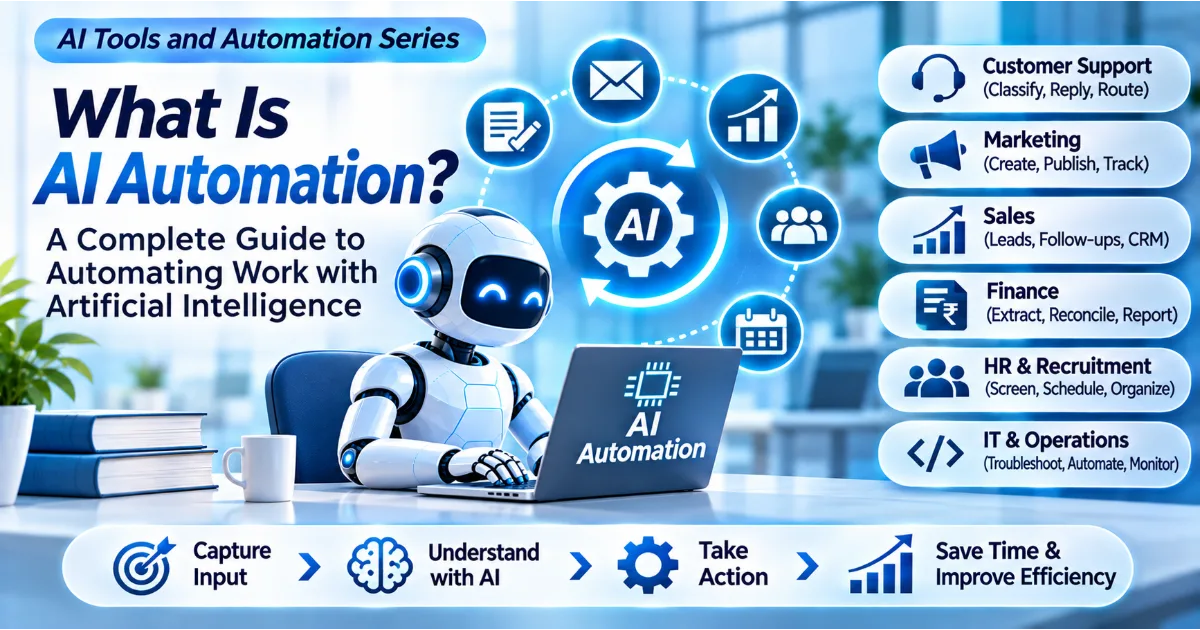
AI automation combines several technologies and components to complete a task from beginning to end. The exact architecture depends on the application, but most workflows follow a common pattern.
1. Receiving Input
Every automated workflow begins with information entering the system.
Input may come from emails, website forms, uploaded documents, spreadsheets, customer conversations, databases, applications, or connected software.
For example, an AI recruitment workflow may receive a candidate's CV through an application form. A customer support workflow may receive a message through email or a website chatbot.
2. Understanding the Information
The AI component analyzes the incoming information and identifies its meaning.
Depending on the task, this may involve natural language processing, document extraction, image recognition, speech recognition, or other machine learning techniques.
In a customer support workflow, the AI may identify whether a message concerns billing, technical assistance, account access, or a refund request.
In a document processing workflow, it may extract names, dates, invoice numbers, payment amounts, and other relevant details.
3. Making a Decision
After interpreting the input, the system determines what should happen next.
The decision may be based on predefined business rules, an AI-generated classification, a prediction, or a combination of these methods.
For example, a support system may automatically categorize routine questions while escalating complaints involving financial disputes.
The important point is that the AI should operate within clearly defined boundaries. It should not be given unlimited authority simply because it can generate a recommendation.
4. Executing an Action
Once the system determines the next step, an automation component performs the action.
This may involve sending an email, updating a database, creating a task, generating a document, assigning a support ticket, or notifying an employee.
The action is usually performed through an application programming interface, an automation platform, or another authorized integration.
5. Monitoring and Improving the Workflow
AI automation systems should be monitored to determine whether they are completing tasks correctly.
Organizations can evaluate processing time, error rates, accuracy, customer satisfaction, escalation frequency, and other relevant performance indicators.
Feedback can be used to improve prompts, business rules, training data, retrieval systems, and workflow design.
A successful AI automation system is not simply one that completes tasks quickly. It must also produce reliable results and operate safely.
AI Automation vs Traditional Automation
Traditional automation and AI automation share the goal of reducing manual work, but they approach tasks differently.
Traditional automation follows predefined instructions. It is particularly effective when the process is predictable and the rules are clearly established.
AI automation introduces capabilities that allow systems to interpret information and handle greater variation.
Consider an invoice processing workflow.
A traditional system may expect invoices to follow a fixed format. If a supplier changes the document layout, the workflow may require adjustments.
An AI-powered document processing system can use document recognition and extraction techniques to identify relevant information across different invoice formats. It can then pass the extracted values to an automated workflow for validation and processing.
Comparison | Traditional automation | AI automation |
|---|---|---|
Main approach | Predefined rules | AI interpretation combined with workflows |
Input | Often structured | Can handle structured and unstructured data |
Decision-making | Rule-based conditions | Rules, AI predictions, or both |
Flexibility | Usually limited to defined scenarios | Can handle more variation |
Examples | Scheduled reports, form routing | Document understanding, intelligent support |
Oversight | Depends on process risk | Often needs additional AI validation |
Neither approach is universally better.
Traditional automation is often more predictable, easier to test, and suitable for stable processes. AI automation is valuable when a workflow involves language, documents, images, variable inputs, or decisions that cannot be described easily through simple rules.
Many effective business solutions combine both.
AI Automation vs Artificial Intelligence
Artificial intelligence and AI automation are related concepts, but they are not interchangeable.
Artificial intelligence refers to technologies that enable machines to perform tasks involving capabilities such as learning, prediction, language understanding, image recognition, and content generation.
AI automation refers to applying those capabilities within workflows that perform actions or complete processes.
For example, an AI model may analyze a document and identify its important information. That is an AI capability.
An automated workflow may take the extracted information, validate it, update a business system, and notify the relevant employee. That is AI automation.
The distinction becomes clearer when an AI model is connected to external applications.
An AI system that only answers questions provides information. An AI automation workflow uses information to initiate or complete actions.
Core Technologies Behind AI Automation
AI automation depends on several technologies working together. Understanding these components helps explain why modern automation can perform more sophisticated tasks than traditional rule-based systems.
Machine Learning
Machine learning enables systems to identify patterns in data and use those patterns to make predictions or classifications.
In business automation, machine learning can support fraud detection, demand forecasting, customer segmentation, predictive maintenance, and other activities.
For example, a financial organization may use machine learning to identify transactions that appear unusual compared with established patterns.
Natural Language Processing
Natural language processing enables computers to work with human language.
It supports tasks such as understanding customer messages, classifying emails, extracting information, translating text, and analyzing sentiment.
This technology is particularly useful when automation workflows involve large volumes of written communication.
Generative AI
Generative AI creates new content based on instructions and available context.
It can produce emails, summaries, reports, descriptions, code, and other outputs.
In an automated workflow, generative AI might prepare a customer response, summarize a meeting, draft a proposal, or generate a report from business data.
Large Language Models
Large language models are AI models trained to process and generate human language.
They are widely used in conversational assistants, document analysis, writing tools, coding assistance, and AI-powered business applications.
When connected to business systems, an LLM can help interpret requests and generate structured instructions for an automation workflow.
Computer Vision
Computer vision enables systems to interpret images and visual information.
It can be used to read scanned documents, recognize objects, inspect products, analyze images, and support quality control.
For example, a manufacturing company may use computer vision to identify visible defects in products moving through an inspection line.
Speech Recognition
Speech recognition converts spoken language into text or structured information.
It can support automated meeting transcription, voice assistants, call analysis, and customer service workflows.
Application Programming Interfaces
APIs allow software systems to communicate with each other.
They are important because AI automation often requires information from several applications.
For example, an AI assistant may retrieve customer information from a CRM system, generate a response using an AI model, and create a follow-up task in a project management platform.
APIs make these interactions possible when the relevant services provide authorized access.
Types of AI Automation
AI automation can be implemented in different ways depending on the complexity of the task and the level of independence required.
Rule-Based AI Automation
Rule-based AI automation combines AI capabilities with predefined business conditions.
The AI component may classify incoming information, while the automation system determines what action to perform.
For example, a system may use AI to identify the category of an email and then apply a predefined routing rule.
This approach is useful because it combines the flexibility of AI interpretation with the predictability of business rules.
Intelligent Process Automation
Intelligent process automation combines automation technologies with AI capabilities to improve business processes.
It may involve document processing, data extraction, workflow orchestration, decision support, and communication between applications.
For example, an insurance company may use intelligent process automation to process claim documents, extract relevant information, identify missing details, and route claims for review.
Robotic Process Automation with AI
Robotic Process Automation, or RPA, uses software bots to perform repetitive interactions with applications.
An RPA bot may copy information between systems, fill out forms, download files, or update records.
When combined with AI, RPA can handle tasks that involve document interpretation, language understanding, or image recognition.
This is particularly useful when an organization needs to automate workflows involving older applications that do not provide convenient APIs.
AI-Powered Workflow Automation
AI-powered workflow automation uses intelligent models within a sequence of connected business activities.
For example, a sales workflow may interpret an incoming inquiry, classify the lead, summarize the customer's requirements, create a CRM record, and notify a sales representative.
The workflow can combine AI-generated outputs with predefined rules and application integrations.
Agentic AI Automation
Agentic AI systems can pursue goals through multiple steps, using tools and feedback to determine what to do next.
An AI agent may interpret a request, create a plan, retrieve information, call authorized tools, evaluate results, and continue until it reaches a defined stopping condition.
For example, an agent might assist with preparing a market research report by searching approved sources, collecting relevant information, organizing findings, and drafting a summary.
Agentic automation is more flexible than a simple fixed sequence, but it also introduces additional risks. Tool permissions, approval requirements, monitoring, and error handling become especially important.
Real-World Applications of AI Automation
AI automation is already relevant to many industries and business functions. Its usefulness depends on the quality of the workflow, available data, business requirements, and the reliability of the AI system.
1. Customer Support Automation
Customer support teams handle repetitive questions about orders, payments, account access, product information, and troubleshooting.
AI automation can help classify incoming requests, identify customer intent, retrieve relevant information, draft responses, and route complex issues to the appropriate team.
For example, an online store may receive a message asking about an order's delivery status. An AI system can interpret the request, retrieve authorized order information, and prepare a response using the latest available delivery details.
Complex complaints or sensitive account issues can be escalated to human representatives.
This can reduce the workload associated with routine questions while helping customers receive faster assistance.
2. Marketing Automation
Marketing teams manage content creation, campaign planning, customer communication, lead qualification, and performance reporting.
AI automation can assist with drafting campaign content, summarizing performance data, classifying audience responses, and preparing personalized communication.
For example, a business may use an automated workflow to collect newsletter sign-ups, classify subscriber interests based on permitted information, and prepare relevant email content.
Human review remains important for brand consistency, factual accuracy, and campaign approval.
3. Sales Automation
Sales teams often spend significant time researching leads, updating CRM systems, preparing follow-up messages, and organizing customer information.
AI automation can summarize conversations, extract important requirements, draft follow-up emails, classify inquiries, and create sales tasks.
For example, after a sales meeting, an AI workflow could generate a summary, identify agreed actions, prepare a follow-up draft, and create tasks for the relevant employees.
This allows sales representatives to spend more time building customer relationships.
4. Recruitment and Human Resources
Recruitment processes involve job descriptions, candidate communication, interview scheduling, document management, and application tracking.
AI automation can help draft job descriptions, organize recruitment documents, prepare interview questions, summarize candidate-submitted information, and send scheduling communications.
However, employment decisions require particular care.
AI systems should not make unsupported judgments about a person's suitability or automatically reject candidates without appropriate oversight. Organizations must consider fairness, privacy, accessibility, and applicable employment regulations.
5. Finance and Accounting
Finance departments process invoices, payment records, expense claims, financial reports, and transaction information.
AI automation can assist with document extraction, expense classification, reconciliation support, and report preparation.
For example, an invoice processing workflow may extract the supplier name, invoice number, date, and total amount. A separate validation process can compare these details with purchase records before routing the invoice for approval.
Financial transactions and accounting decisions should be subject to appropriate controls and verification.
6. Healthcare Administration
Healthcare organizations handle appointment requests, patient communication, document management, and administrative records.
AI automation can support appointment scheduling, administrative document processing, transcription, and routine communication.
For example, a scheduling assistant may interpret an appointment request and identify suitable available slots based on the clinic's scheduling rules.
Healthcare applications require strict attention to patient privacy, data security, clinical safety, and regulatory requirements. AI-generated clinical information must not replace qualified medical judgment.
7. Education
Educational institutions can use AI automation to support administrative work, learning materials, communication, and student services.
An educational workflow may organize student inquiries, prepare course summaries, generate practice questions, or help instructors draft lesson materials.
AI tools can also assist learners by explaining difficult topics and providing additional examples.
Teachers and institutions remain responsible for educational quality, assessment integrity, and the appropriate use of student information.
8. E-Commerce
Online stores manage product descriptions, customer inquiries, orders, returns, inventory information, and promotional campaigns.
AI automation can help classify customer messages, prepare product descriptions, summarize customer feedback, and assist with inventory analysis.
For example, a workflow may analyze product reviews to identify recurring complaints about size, quality, delivery, or usability.
These insights can help businesses understand customer concerns and identify areas for improvement.
9. Software Development
Software teams can use AI automation to support code documentation, test generation, issue classification, code review assistance, and release communication.
For example, a development workflow may classify incoming bug reports, identify related project components, create an issue in a tracking system, and notify the responsible team.
AI-generated code and technical changes must be reviewed and tested before deployment.
10. Business Operations
Many business processes involve repetitive communication and coordination.
AI automation can support meeting summaries, task creation, document preparation, report generation, internal knowledge retrieval, and routine notifications.
For example, a meeting assistant may transcribe a discussion, summarize key decisions, identify action items, and prepare tasks for team members.
Employees should review important summaries and confirm responsibilities before actions are treated as final.
Popular AI Automation Tools and Platforms
Different platforms support different parts of the AI automation process. Some focus on connecting applications, while others provide AI models, workflow builders, or agent development capabilities.
Zapier
Connects supported applications and automates workflows using triggers and actions. It can be used to connect business tools and incorporate AI capabilities into supported workflows.
Make
Provides a visual environment for designing workflows that connect applications, process information, and execute multiple steps.
n8n
Supports visual workflow development, integrations, API connections, and AI-powered automation. It can be useful for technical users who want more control over their workflows.
Microsoft Power Automate
Supports workflow automation across supported Microsoft and third-party services, including business process automation and desktop automation.
UiPath
Provides robotic process automation and intelligent automation capabilities for organizations seeking to automate complex business processes.
OpenAI API
Enables developers to integrate AI model capabilities into applications and automated workflows through supported APIs.
Google Gemini
Provides generative AI capabilities that can be incorporated into supported development and productivity workflows.
The right platform depends on the task, technical requirements, available integrations, security expectations, and budget. Some businesses may prefer no-code tools, while others may require custom development and greater control over infrastructure.
How to Build Your First AI Automation Workflow
You do not need to begin with a complicated enterprise system. A simple workflow can demonstrate how AI and automation work together.
Consider building an AI-powered email classification system.
The objective is to organize incoming business emails into categories such as sales inquiries, customer support, billing, and general questions.
Step 1: Define the Objective
Start by describing the problem.
For example, the business receives many emails every day, and employees spend time reading each message and forwarding it to the appropriate department.
The objective is to classify messages and route them automatically.
Step 2: Choose an Input Source
Connect an approved email account or use a test dataset containing sample messages.
The system should receive the email subject and message body, along with only the additional information needed for the task.
Step 3: Add an AI Classification Step
Provide the email content to an AI model and ask it to identify the appropriate category.
The model can return a structured result containing the category, a short summary, and a confidence indicator if supported by the chosen implementation.
Step 4: Validate the Result
Before taking action, check whether the classification is valid.
For example, the system may verify that the category belongs to an approved list. If the result is missing, unclear, or inconsistent, the workflow should send the message for human review.
Step 5: Define the Automation Rules
Create rules for routing each category.
Sales inquiries can go to the sales team, support requests can go to customer service, and billing messages can go to the finance department.
Step 6: Execute the Action
The automation platform can create a task, assign the message, add a label, or notify the relevant employee.
Step 7: Test and Monitor
Test the workflow using different examples, including unclear messages and unusual requests.
Measure classification accuracy, incorrect routing, processing time, and the number of messages requiring human intervention.
This small project demonstrates the central idea behind AI automation: AI interprets information, while automation connects the result to an action.
Benefits of AI Automation
AI automation can create value across different business functions when it is implemented correctly.
Improved Productivity
Employees spend significant time performing repetitive tasks such as reading messages, organizing documents, preparing summaries, and updating records.
AI automation can reduce the effort required for these activities, allowing employees to concentrate on higher-value work.
Faster Processing
Automated workflows can process information and perform routine actions without waiting for every task to be completed manually.
This can improve response times and reduce operational delays.
Better Handling of Unstructured Information
Traditional systems often struggle with information that does not follow a fixed format.
AI can help interpret emails, documents, messages, and images, making it possible to automate workflows that were previously difficult to standardize.
Greater Operational Consistency
Well-designed workflows can apply the same approved rules and procedures across repeated tasks.
This can reduce variation caused by inconsistent manual processing.
Improved Scalability
As a business grows, the volume of messages, documents, and administrative activities may increase.
AI automation can help manage additional workload without requiring every repetitive task to be handled manually.
However, scaling an AI workflow also requires monitoring, infrastructure planning, and sufficient human support.
Better Access to Business Information
AI systems connected to approved knowledge sources can help employees retrieve information, summarize documents, and find relevant records.
This can make organizational information easier to use.
Support for Decision-Making
AI can identify patterns, summarize available evidence, and highlight potential risks or opportunities.
These capabilities can support human decision-making, although important decisions should still involve appropriate verification and accountability.
Challenges and Risks of AI Automation
AI automation offers important opportunities, but adopting it without understanding its limitations can create problems.
Inaccurate Outputs
AI models may misunderstand instructions, extract incorrect information, or generate unsupported responses.
If an automated workflow uses incorrect information to perform an action, the consequences may extend beyond a simple inaccurate answer.
Businesses should introduce validation steps, confidence thresholds where appropriate, and human review for important decisions.
Data Privacy and Security
AI automation often involves sensitive information such as customer records, employee details, financial documents, and internal business data.
Organizations should understand how information is collected, stored, processed, and shared by each platform.
Access should be restricted to authorized systems and employees. Sensitive data should not be sent to external AI services without appropriate approval and safeguards.
Integration Complexity
Different business applications may use different data structures, authentication methods, and APIs.
Connecting them into one workflow can require technical planning and ongoing maintenance.
Organizations should verify that the required integrations are supported before selecting an automation platform.
Unexpected Workflow Behavior
AI systems can produce different outputs for similar inputs. This variability can affect workflows that require strict consistency.
A workflow should be tested with normal, unusual, incomplete, and potentially misleading inputs.
Important actions should have validation and recovery mechanisms.
Over-Automation
Not every process should be automated.
Activities involving sensitive customer relationships, complex financial decisions, legal responsibilities, or important employment decisions may require human judgment.
Automating a poor process can simply make mistakes happen faster.
Employee Adoption
Employees may be uncertain about how AI automation will affect their responsibilities.
Organizations should explain why automation is being introduced, provide training, establish clear responsibilities, and involve employees in identifying suitable use cases.
Maintenance and Cost
AI services, software subscriptions, API usage, and integrations can create ongoing costs.
Workflows also need maintenance when applications change, business policies are updated, or model behavior evolves.
The total cost should be evaluated against measurable business benefits.
Best Practices for Implementing AI Automation
Successful AI automation begins with identifying the right problem rather than choosing a technology first.
Start with a process that is repetitive, well understood, and relatively low risk. Document how the process currently works, including its inputs, decisions, actions, exceptions, and expected outcomes.
Then determine where AI can add value. If a task involves interpreting text, extracting information, classifying requests, or generating summaries, an AI component may be useful.
Keep business rules separate from AI-generated decisions wherever practical. For example, an AI model may classify an invoice, but the financial approval process should follow established company rules.
Introduce human approval for actions that involve money, sensitive information, legal commitments, customer disputes, or significant operational consequences.
Use reliable information sources and make sure the AI system has access only to the information required for its task.
Test workflows before deploying them to real users. Include examples that represent ordinary situations as well as unusual cases.
Finally, establish measurable performance indicators. A workflow should be judged by accuracy, processing time, cost, reliability, and business outcomes rather than by the number of tasks it claims to automate.
How Businesses Should Choose Tasks for AI Automation
Businesses sometimes attempt to automate too many processes at once. This can create unnecessary complexity and make it difficult to determine whether the technology is producing meaningful value.
A better approach is to evaluate each potential use case using a few practical questions.
Is the task repetitive? Activities performed frequently may offer opportunities for automation.
Does the task involve unstructured information? Emails, documents, messages, and images may benefit from AI interpretation.
Can the process be clearly defined? A business should understand the expected inputs, outputs, and decision boundaries.
What happens if the system makes a mistake? Low-risk tasks are generally better starting points than processes with serious financial, legal, or safety consequences.
Can the result be verified? Workflows are easier to manage when outputs can be checked against reliable information or business rules.
Can the business measure the benefit? The organization should identify what improvement it expects, such as reduced processing time, fewer manual steps, or faster customer responses.
A practical implementation strategy is to start with one process, measure its performance, improve it, and then expand to other suitable workflows.
The Future of AI Automation
AI automation is likely to become more integrated into everyday software and business operations.
Many applications already include AI features that help users write, summarize, analyze, and organize information. Over time, these capabilities are likely to become more closely connected to the actions people perform within those applications.
AI agents may increasingly coordinate multi-step workflows, interact with approved tools, and handle tasks that require several decisions.
Multimodal AI may allow automated systems to interpret combinations of text, images, audio, and video. This could support applications such as visual inspections, voice-based customer service, document understanding, and operational monitoring.
Another important development is the growth of human-AI collaboration. Rather than removing people from every process, organizations may redesign workflows so that AI handles routine activities while employees supervise decisions, resolve exceptions, and manage complex situations.
Businesses will also need stronger governance as automation becomes more capable. Access permissions, audit trails, data privacy, model evaluation, and human accountability will remain essential.
The organizations that benefit most will not necessarily be those that automate the greatest number of tasks. They will be those that identify meaningful problems, choose suitable technologies, and design reliable processes around them.
Conclusion
AI automation combines artificial intelligence with automated workflows to help systems interpret information, make decisions within defined boundaries, and perform useful actions.
It goes beyond traditional automation by making it possible to work with information such as emails, documents, conversations, and images that may not follow fixed structures.
Its applications include customer support, marketing, recruitment, finance, healthcare administration, education, e-commerce, software development, and everyday business operations.
However, successful implementation requires more than connecting an AI model to an automation tool. Businesses must define clear objectives, select suitable processes, protect sensitive information, validate outputs, establish permissions, and maintain appropriate human oversight.
For beginners, the best way to learn AI automation is to start small. Choose one repetitive task, understand how it currently works, introduce an AI capability where it adds value, connect it to an appropriate action, and measure the results.
AI automation is not simply about making machines perform more tasks. It is about redesigning work so that people and intelligent systems can work together more effectively.
Let's Discuss
Have you started using AI automation in your personal or professional work? Which task would you like to automate first: customer support, email management, content creation, marketing, recruitment, reporting, or business operations?
Share your experiences, challenges, and ideas. Your examples may help others discover practical ways to use AI in their everyday work.
#AIAutomation #ArtificialIntelligence #BusinessAutomation #AITools #FutureOfWork