Automation has been an important part of modern business and technology for decades. Companies use software to process invoices, send notifications, manage customer records, schedule activities, generate reports, and perform repetitive operations. Traditional automation helps organisations reduce manual effort by executing predefined instructions whenever specific conditions are met.
However, traditional automation has limitations. It works particularly well when tasks follow predictable rules, but it can become difficult to manage when information is unstructured, decisions require interpretation, or the next action depends on changing circumstances.
Artificial Intelligence is changing this landscape. AI automation combines AI technologies with automated workflows to help systems interpret information, recognise patterns, generate content, make recommendations, and perform selected actions with less manual intervention.
For example, a traditional automation system may receive a customer enquiry and send a standard confirmation email. An AI-powered workflow can analyse the message, understand its subject, identify the customer's likely requirement, retrieve relevant information, prepare a personalised response, and send it for human approval.
This creates opportunities across customer support, marketing, sales, finance, human resources, software development, operations, and many other business functions.
Continue Reading
AI automation is not limited to large enterprises with dedicated technology teams. Small businesses, independent professionals, startups, and growing organisations can also use AI-powered tools to improve everyday processes. Even a simple workflow that converts incoming enquiries into organised records can save time and reduce administrative work.
At the same time, AI automation requires careful planning. Incorrect information, excessive permissions, privacy concerns, security vulnerabilities, and poorly designed workflows can create new problems instead of solving existing ones.
Understanding AI automation therefore involves more than learning how to connect applications or use popular AI tools. It requires understanding how automation works, where Artificial Intelligence adds value, which processes are suitable for automation, and how to measure the results.
This guide explains AI automation from the fundamentals to practical implementation, including its technologies, types, business applications, benefits, limitations, tools, and future developments.
What Is AI Automation?
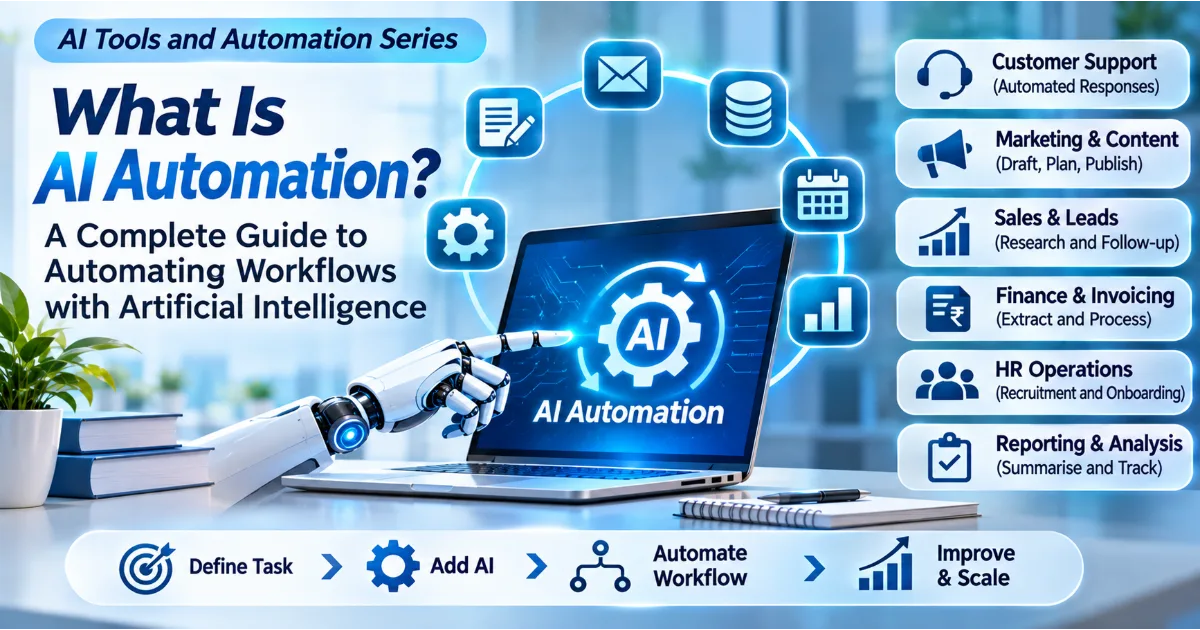
AI automation is the use of Artificial Intelligence technologies within automated processes to perform tasks that may involve understanding information, generating content, recognising patterns, making predictions, or supporting decisions.
Traditional automation generally executes predefined rules and instructions. AI automation introduces capabilities that allow systems to interpret more complex inputs and respond according to the information they receive.
Consider an organisation that receives hundreds of customer enquiries every week.
A traditional workflow may place every enquiry into a spreadsheet and send the same confirmation message.
An AI-powered workflow can go further. It may read the message, identify whether it concerns pricing, technical support, account access, or product information, and organise the enquiry accordingly. It may also retrieve relevant information and prepare a suggested response.
The workflow can then send the response for approval or automatically handle selected low-risk enquiries under carefully defined conditions.
The main purpose of AI automation is to combine the efficiency of automated processes with the interpretation and generation capabilities of AI.
AI automation does not necessarily mean that a system operates independently. Many practical implementations combine automated steps, AI-generated recommendations, and human approval.
How Is AI Automation Different from Traditional Automation?
Traditional automation follows rules that developers or users configure in advance.
For example, a business may create a workflow that sends an email whenever someone submits a contact form. If the required condition is met, the system performs the configured action.
This approach is effective when the input and expected output are predictable.
AI automation is more flexible when the workflow involves information that cannot easily be handled through fixed rules.
Imagine receiving customer messages that are written in different languages, use informal expressions, contain spelling mistakes, or describe several problems at once.
A traditional workflow may struggle to classify these messages using simple keyword rules.
An AI model can analyse the language and identify the likely subject. The automation platform can then use that classification to direct the message to the appropriate department.
The difference can be understood through three examples.
Traditional automation: When a customer completes a form, add the submitted information to a spreadsheet and send a confirmation email.
AI-assisted automation: Read the submitted message, identify its subject, classify the enquiry, and prepare a suitable response.
AI agent-based automation: Understand the customer's objective, retrieve relevant information from authorised systems, perform permitted actions, evaluate the results, and continue through a multi-step workflow.
These approaches are not competing technologies. They can work together.
A well-designed business process often uses traditional automation for predictable operations, AI for interpretation and content generation, and agent-based capabilities when a workflow requires more flexible decisions.
How Does AI Automation Work?
AI automation usually combines several components that work together to receive information, process it, make decisions, and perform actions.
The exact architecture depends on the application, but most workflows follow a similar pattern.
1. A Trigger Starts the Workflow
Every automation needs a starting condition.
A trigger may occur when someone submits a website form, receives an email, uploads a document, creates a support ticket, or updates a database record.
For example, a business may configure a workflow to begin whenever a new customer enquiry arrives.
The trigger tells the automation system that a task needs to be processed.
2. The System Collects Information
After the workflow begins, it retrieves the information required to perform the task.
This may include a customer's message, contact details, an uploaded document, product information, or records from a connected business application.
The information should be collected through authorised integrations and handled according to applicable privacy requirements.
3. Artificial Intelligence Processes the Input
An AI model analyses the information and performs the required task.
Depending on the workflow, this may involve natural language processing, image recognition, classification, prediction, summarisation, or content generation.
For example, a customer support workflow may use a language model to understand the meaning of an enquiry and identify its main subject.
4. The Workflow Evaluates the Result
The automation system uses the AI output to determine what should happen next.
A customer message classified as a billing question may be directed to the finance support team. A technical issue may be assigned to the technical department.
Some workflows use fixed rules to validate the AI result. Others may require a confidence threshold or human review.
This step is important because an AI model's output should not automatically be treated as correct.
5. The System Performs an Action
Once the result has been evaluated, the workflow performs the appropriate operation.
It may create a database record, update a customer profile, prepare an email, assign a support ticket, generate a document, or notify an employee.
The actions available depend on the connected applications and granted permissions.
6. Human Approval Is Requested When Necessary
Sensitive or consequential actions should include appropriate approval controls.
For example, an AI system may prepare a refund recommendation, but an authorised employee should approve the refund before it is processed.
Similarly, an AI-powered sales workflow may prepare an outreach email without sending it automatically.
7. The Workflow Records the Result
A reliable automation system should record what happened.
It may store the task status, AI-generated classification, completed actions, errors, and approval information.
These records help teams investigate problems, evaluate performance, and improve the workflow.
Important Technologies Behind AI Automation
AI automation is not a single technology. It combines different capabilities depending on the problem being solved.
1. Machine Learning
Machine Learning enables systems to learn patterns from data and use those patterns to make predictions or classifications.
For example, a machine learning model may identify suspicious transactions based on patterns found in historical information.
In an automated workflow, the model's prediction can trigger an action such as flagging a transaction for review.
2. Natural Language Processing
Natural Language Processing, commonly known as NLP, helps computers process and interpret human language.
It can support tasks such as sentiment analysis, language identification, text classification, information extraction, and document processing.
For example, an AI automation workflow may use NLP to identify whether a customer message contains a complaint, product enquiry, or technical issue.
3. Generative AI
Generative AI creates new content based on patterns learned during training.
It can generate emails, reports, summaries, descriptions, code, and other outputs.
Within an automated workflow, a generative model may prepare a personalised response using information retrieved from an authorised source.
Generated content should be reviewed when accuracy, reputation, or compliance matters.
4. Computer Vision
Computer vision enables systems to analyse and interpret visual information.
It can help automate document processing, image classification, visual inspection, and object recognition.
For example, a business may use computer vision and document extraction technology to identify information from scanned invoices.
5. Optical Character Recognition
Optical Character Recognition, commonly called OCR, converts text contained in images or scanned documents into machine-readable information.
OCR can support automated invoice processing, document digitisation, form extraction, and record management.
Modern document processing workflows may combine OCR with AI models to understand the meaning and structure of extracted information.
6. Large Language Models
Large Language Models can understand and generate text, making them useful for workflows involving natural language.
They can summarise documents, classify messages, draft responses, explain information, and interact with tools.
Their outputs must be validated because language models can generate incorrect or unsupported information.
7. Application Programming Interfaces
Application Programming Interfaces, or APIs, allow different software applications to communicate.
AI automation often depends on APIs to connect an AI model with email services, databases, customer relationship management systems, payment applications, and other business software.
Secure API integration is essential because the connected applications may contain sensitive information.
8. Robotic Process Automation
Robotic Process Automation, commonly known as RPA, uses software bots to perform repetitive computer-based activities.
An RPA bot may copy information between applications, enter data into forms, download reports, or process predefined transactions.
When combined with AI, RPA can support workflows involving documents, unstructured information, and more complex inputs.
Types of AI Automation
AI automation can be implemented in different ways depending on the level of intelligence, flexibility, and independence required.
1. Rule-Based Automation
Rule-based automation follows predefined conditions.
For example, a business may configure a workflow that sends a notification whenever a new order is placed.
Although this is not necessarily AI-powered, it is often an important foundation for AI automation.
2. AI-Assisted Automation
AI-assisted automation uses Artificial Intelligence to support selected steps within an otherwise structured workflow.
For example, an automation system may receive customer messages and use an AI model to classify them before sending them to the appropriate department.
The remaining operations may follow fixed rules.
This is often a practical starting point for organisations introducing AI into existing processes.
3. Predictive Automation
Predictive automation uses machine learning models to estimate future outcomes or identify patterns.
For example, a retailer may use a predictive model to estimate product demand and trigger inventory alerts when stock levels are likely to become insufficient.
Predictions are not guarantees. Their reliability depends on data quality, model performance, and changing conditions.
4. Generative Automation
Generative automation uses generative AI to create content within a workflow.
It may prepare customer emails, product descriptions, meeting summaries, internal reports, and other documents.
The generated content can be saved as a draft, reviewed by an employee, or used in a controlled automated process.
5. Agentic Automation
Agentic automation uses AI agents to pursue objectives through multiple actions.
An agent may interpret an instruction, plan the required steps, select tools, retrieve information, and continue based on the results.
For example, an agent may help prepare a research report by gathering information from approved sources, organising findings, and drafting a document.
Agentic automation requires stronger permission controls and monitoring because it can involve more flexible decision-making and tool execution.
What Is the Difference Between AI Automation, RPA, and AI Agents?
These three concepts are related, but they solve different problems.
Traditional automation uses predefined rules to execute predictable operations.
RPA focuses on automating repetitive interactions with software applications, often by simulating actions that a person would perform through a graphical interface.
AI automation combines automation with AI capabilities such as language understanding, prediction, image recognition, and content generation.
AI agents introduce systems that can select actions based on an objective and the information available during execution.
Consider an invoice processing example.
Traditional automation may receive a digital invoice and move it to a specified folder.
An RPA bot may open an accounting application, enter invoice details, and save the record.
An AI-powered workflow may extract information from an invoice, identify the supplier, recognise the invoice amount, and flag missing fields.
An AI agent may coordinate several approved steps, retrieve supplier information, compare records, prepare an exception report, and request human approval when discrepancies are found.
The best solution depends on the task. A simple process does not need a complex agent when a reliable rule-based workflow can achieve the same result.
Real-World Applications of AI Automation
AI automation can support many business functions. Its value is greatest when it addresses a clearly defined process and produces measurable improvements.
1. Customer Support Automation
Customer support teams receive enquiries through websites, email, chat applications, and other channels.
AI automation can help classify incoming requests, identify common issues, retrieve relevant documentation, and prepare response drafts.
For example, a customer may submit a question about a product's features.
The workflow can identify the subject, search an approved knowledge base, and prepare an answer based on the available documentation.
A human representative can review the response before it is sent.
More advanced systems may handle common low-risk questions automatically while escalating complex or sensitive cases.
2. Sales Automation
Sales teams often spend time researching potential customers, updating records, preparing proposals, and following up on enquiries.
AI automation can support several of these activities.
A workflow may receive a new lead, extract relevant details, classify the enquiry, and create a record in a CRM system.
An AI model may also help prepare an initial response based on the customer's stated requirements.
Sales representatives should review important communications and ensure that outreach follows applicable consent and privacy requirements.
3. Marketing Automation
Marketing activities involve content creation, campaign planning, audience segmentation, performance reporting, and publishing coordination.
AI automation can help prepare content drafts, organise campaign information, summarise performance, and identify recurring audience interests.
For example, a marketing team may connect campaign analytics with an AI model that prepares a weekly performance summary.
The system can organise metrics and highlight changes, while a marketer reviews the conclusions before making decisions.
4. Social Media Management
Businesses manage multiple social media channels, each with different publishing formats and audience expectations.
AI automation can support content planning, caption drafting, hashtag research, content repurposing, and scheduling.
For example, a company may prepare a long-form article and use AI to create draft social media posts for different platforms.
A human editor should check that each version reflects the platform's audience and accurately represents the original content.
Automated publishing should also follow the relevant platform's policies and account permissions.
5. Finance and Accounting
Finance teams process invoices, expense records, payment information, reconciliations, and financial reports.
AI automation can support document extraction, transaction classification, anomaly detection, and report preparation.
An invoice workflow may extract the supplier name, invoice number, date, and amount before sending the information to an accounting system.
The system should validate extracted values and flag discrepancies for review.
Financial transactions and regulatory reporting require appropriate verification and authorisation.
6. Human Resources
HR teams manage recruitment, employee documentation, onboarding, training, and internal communication.
AI automation can help organise job applications, prepare interview schedules, draft job descriptions, and answer questions using approved HR policies.
For example, a new employee may receive an automated onboarding checklist based on their department and joining date.
AI should not independently make consequential employment decisions without appropriate human oversight and fairness controls.
7. Recruitment and Applicant Tracking
Recruitment processes involve collecting applications, organising candidate information, communicating with applicants, and scheduling interviews.
AI automation can help extract information from CVs, organise applications, and prepare summaries for recruiters.
However, automated systems may misinterpret experience, overlook relevant qualifications, or reproduce bias.
Recruitment decisions should involve appropriate human evaluation, transparent criteria, and compliance with applicable employment requirements.
8. E-Commerce Automation
Online businesses handle product enquiries, orders, delivery updates, customer questions, and returns.
AI automation can support product information retrieval, enquiry classification, customer response drafting, and order-related notifications.
A customer may ask whether a particular product is suitable for a stated requirement.
An AI workflow can search the authorised catalogue and prepare a response using verified specifications.
Product availability, pricing, delivery information, and refund eligibility should be confirmed through the actual business systems.
9. IT Helpdesk Automation
IT departments receive support requests involving login problems, software errors, device issues, and access permissions.
AI automation can classify tickets, retrieve troubleshooting instructions, summarise technical information, and suggest next steps.
For example, an employee may report that they cannot access an internal application.
The workflow can identify the issue category, retrieve approved troubleshooting instructions, and create a ticket for the appropriate team.
Actions involving account permissions, security settings, or critical systems require suitable approval.
10. Document Processing
Businesses work with contracts, invoices, application forms, reports, purchase orders, and other documents.
AI automation can combine OCR, document classification, information extraction, and workflow rules.
A document processing system may identify the document type, extract selected fields, and route the result to the appropriate department.
Important information should be validated before being used for legal, financial, or operational purposes.
11. Data Analysis and Reporting
AI automation can support repetitive reporting activities.
A workflow may retrieve data from an authorised database, calculate defined metrics, and prepare a written summary.
For example, a business may automatically generate a weekly sales report with information about revenue, order volume, and product performance.
Calculations should be performed using reliable data processing methods, and AI-generated interpretations should be checked against the underlying figures.
12. Project Management
Project teams manage tasks, milestones, dependencies, updates, and deadlines.
AI automation can summarise project discussions, extract action items from meeting notes, identify overdue tasks, and prepare status reports.
For example, a project manager may receive a weekly summary of incomplete tasks and outstanding dependencies.
The system can help organise information, but project owners remain responsible for priorities and decisions.
13. Education and Online Learning
Educational platforms can use AI automation to prepare practice questions, organise learning materials, summarise lessons, and support student enquiries.
An online learning platform may use an AI assistant to explain a topic or generate additional practice exercises.
Educational content should be checked for accuracy and appropriate difficulty.
14. Healthcare Administration
Healthcare organisations may explore AI automation for administrative tasks such as organising documents, summarising authorised records, and managing routine enquiries.
These applications require strong privacy, security, and regulatory controls.
AI-generated clinical information should not replace qualified healthcare professionals or validated clinical processes.
Practical AI Automation Examples for Small Businesses
AI automation is not only for large companies. Small businesses can begin with simple workflows that address everyday operational challenges.
Example 1: Website Enquiry Management
A small business receives enquiries through a website contact form.
An AI-powered workflow can read the submitted message, classify the request, and organise the details in a spreadsheet or CRM system.
It can prepare a draft acknowledgement and notify the relevant employee.
The business owner can review the message before responding.
This reduces manual sorting and helps ensure that enquiries are organised.
Example 2: Automated Content Preparation
A business publishes articles and social media updates regularly.
An AI workflow can accept an approved topic, prepare a content outline, generate a draft, and create alternative captions for different social platforms.
The content manager reviews the drafts, checks facts, and approves the final versions.
This can reduce repetitive preparation without removing editorial responsibility.
Example 3: Customer Feedback Analysis
A business receives customer feedback through forms and support messages.
An AI model can classify the feedback into themes such as product quality, pricing, delivery, usability, and customer service.
The workflow can prepare a summary showing frequently reported issues.
Managers can use the information to identify areas that need attention.
Example 4: Invoice Organisation
A business receives invoices through email.
An automation workflow can identify attachments, extract selected invoice information, and place the documents in the appropriate folders.
The extracted data can be reviewed before entering it into accounting software.
Example 5: Meeting Summary and Action Items
A business conducts regular internal meetings.
An AI-powered workflow can process authorised meeting notes or transcripts, prepare a summary, and extract possible action items.
The meeting organiser can review and confirm the tasks before distributing them to the team.
Example 6: Customer Follow-Up Preparation
A sales team may need to follow up with customers after product demonstrations.
An AI workflow can organise meeting notes, identify the customer's stated requirements, and prepare a follow-up email draft.
A salesperson reviews the message and decides when it should be sent.
Popular AI Automation Tools and Platforms
Different tools support different parts of an AI automation workflow. Some focus on connecting applications, while others provide AI models, agent frameworks, or business process management capabilities.
Features, integrations, and pricing may change over time, so businesses should evaluate the current offering before selecting a platform.
1. Zapier
<Entity value="Zapier" category="software" disambig="Workflow automation platform"/> connects different applications and allows users to create automated workflows.
It is commonly used to transfer information between applications, trigger actions, and coordinate repetitive business tasks.
AI capabilities can be incorporated into supported workflows.
2. Make
<Entity value="Make" category="software" disambig="Visual workflow automation platform"/> provides a visual environment for connecting applications and designing automation scenarios.
Users can create workflows involving multiple steps, conditions, and data transformations.
It can be useful for businesses that need more detailed control over workflow structure.
3. n8n
<Entity value="n8n" category="software" disambig="Workflow automation and integration platform"/> is a workflow automation platform that supports connections between applications, APIs, and AI services.
It can be used to build custom workflows and connect different systems.
Its deployment and configuration options make it useful for developers and technically capable teams.
4. Microsoft Power Automate
<Entity value="Microsoft Power Automate" category="software" disambig="Microsoft business process automation platform"/> supports workflow automation across Microsoft products and connected services.
It can help automate approvals, notifications, document processing, and other business operations.
5. UiPath
<Entity value="UiPath" category="software" disambig="Robotic process automation and enterprise automation platform"/> provides automation capabilities for business processes, including RPA and AI-related workflows.
It is used by organisations seeking to automate repetitive operations across enterprise applications.
6. Workato
<Entity value="Workato" category="software" disambig="Enterprise integration and automation platform"/> provides integration and workflow automation capabilities for business applications.
It can support processes that connect information across multiple enterprise systems.
7. OpenAI APIs
<Entity value="OpenAI API" category="software" disambig="Developer platform for integrating OpenAI models"/> can be used to integrate AI models into custom applications and automated workflows.
Developers can build systems that process text, generate content, and use supported tools according to the application's design.
8. Google Cloud AI
<Entity value="Google Cloud AI" category="software" disambig="Google cloud-based AI development and machine learning services"/> provides cloud services for building and deploying AI applications.
It can support machine learning, generative AI, and data processing workflows.
9. Microsoft Azure AI
<Entity value="Microsoft Azure AI" category="software" disambig="Microsoft cloud AI services"/> provides services for developing AI-powered applications and integrating AI capabilities into business systems.
It can support language processing, document intelligence, and other AI applications.
10. Amazon Web Services AI Services
<Entity value="Amazon Web Services" category="brand" disambig="Cloud computing and technology services"/> provides cloud infrastructure and AI-related services that businesses can use to build and deploy automated applications.
The appropriate platform depends on technical requirements, existing software, security needs, cost, and available expertise.
How to Build Your First AI Automation Workflow
The best way to learn AI automation is to begin with a small, useful workflow rather than attempting to automate an entire business.
A practical first project is a system that receives customer enquiries, classifies them, and prepares a response draft.
Step 1: Select a Repetitive Task
Choose an activity that happens regularly and consumes manual effort.
For example, employees may spend time reading enquiries and deciding which department should handle them.
Step 2: Map the Existing Process
Write down how the task currently works.
Identify the starting event, information required, decisions involved, actions performed, and final result.
Understanding the existing process helps reveal unnecessary steps and possible improvements.
Step 3: Define the Automation Objective
Set a clear goal.
For example, the workflow should classify incoming enquiries into predefined categories and prepare a response draft based on approved information.
Avoid vague objectives that are difficult to evaluate.
Step 4: Select an Automation Platform
Choose a platform that can connect the applications involved in the workflow.
For a simple project, a visual automation platform may be sufficient.
A custom application may be more appropriate when the workflow requires specialised logic or deeper integration.
Step 5: Connect an AI Model
Integrate an AI model that can perform the required task.
For the enquiry workflow, the model may classify messages and prepare draft responses.
Provide clear instructions and define the expected output structure.
Step 6: Connect the Business Applications
Connect the website form, email service, spreadsheet, CRM system, or other required applications.
Use secure authentication and grant only the necessary permissions.
Step 7: Add Validation and Approval
Check the AI output before taking important actions.
For example, the system may confirm that the enquiry category is one of the approved options.
A human employee should review the generated response before sending it during the initial deployment.
Step 8: Test Different Inputs
Test ordinary enquiries, incomplete messages, unclear requests, multiple questions, and unexpected information.
Observe whether the workflow handles each situation correctly.
Step 9: Monitor Performance
Measure classification accuracy, processing time, error frequency, and the amount of manual effort saved.
Review failures and improve the instructions or workflow.
Step 10: Expand Carefully
Once the workflow performs reliably, consider adding more features.
You may introduce additional categories, connect another application, or automate selected low-risk actions.
Expand only when the benefits justify the added complexity.
How to Identify Processes Suitable for AI Automation
Not every business task should be automated. Some processes are better handled manually, while others benefit from traditional automation rather than AI.
A useful starting point is to examine how often a task occurs and how much time it consumes.
Tasks that happen frequently and involve repetitive information processing are often good candidates.
However, the decision should also consider the consequences of mistakes.
Repetitive Tasks
Activities performed repeatedly may be suitable for automation.
Examples include sorting enquiries, preparing summaries, organising documents, and generating standard reports.
Information-Heavy Tasks
Processes that involve reading, extracting, classifying, or summarising large amounts of information may benefit from AI.
Examples include document processing, feedback analysis, and customer message classification.
Rule-Based Processes with Variable Inputs
A workflow may follow a consistent business process while receiving information in many different formats.
AI can help interpret the inputs before traditional automation executes the remaining steps.
Tasks with Measurable Outcomes
Suitable automation projects should have results that can be measured.
For example, a business may track the time required to process an enquiry before and after introducing automation.
Tasks Requiring Human Judgement
Some tasks should remain under human control.
High-impact financial decisions, medical decisions, legal conclusions, employment decisions, and other consequential activities require appropriate professional judgement and oversight.
Benefits of AI Automation
AI automation can create value when it addresses a genuine operational problem.
1. Reduced Manual Work
AI-powered workflows can handle repetitive activities such as sorting information, extracting data, preparing drafts, and generating summaries.
Employees may spend less time on administrative work.
2. Faster Processing
Automated systems can process incoming information without requiring someone to manually begin every step.
This may reduce delays in customer support, document handling, and internal operations.
3. Improved Consistency
A well-designed workflow can apply the same classification rules, validation requirements, and approval steps across repeated tasks.
This can reduce variation in routine processes.
4. Better Information Organisation
AI can help convert unstructured information into organised categories and summaries.
This makes it easier for employees to retrieve and review relevant information.
5. Improved Customer Experience
AI automation can help businesses respond to common enquiries more quickly and route complex requests to the appropriate employees.
However, speed should not come at the expense of accuracy or customer understanding.
6. Increased Productivity
Employees can use AI automation to reduce repetitive work and focus on activities that require communication, creativity, problem-solving, and decision-making.
7. Scalable Operations
Automation can help businesses manage larger volumes of routine tasks without increasing manual effort at the same rate.
Scaling still requires sufficient infrastructure, monitoring, and quality control.
8. Better Operational Insights
AI-powered systems can organise information from multiple sources and identify recurring patterns.
Managers may use these insights to understand operational challenges and identify areas for improvement.
9. Support for Small Businesses
Smaller organisations can use accessible automation platforms and AI services to improve workflows that would otherwise require additional administrative resources.
Limitations and Risks of AI Automation
AI automation introduces risks that should be considered before deployment.
1. Incorrect AI Outputs
AI models may misclassify information, generate incorrect content, or misunderstand instructions.
A workflow that automatically acts on incorrect results can create operational problems.
Validation and human review should be included where necessary.
2. Data Privacy
Automation systems may process customer details, employee records, financial information, and internal documents.
Businesses must understand how information is collected, transmitted, stored, and processed.
Sensitive information should only be shared with appropriately authorised systems.
3. Security Risks
Connected applications and APIs can introduce security vulnerabilities.
Weak authentication, excessive permissions, exposed credentials, and insecure integrations can create opportunities for unauthorised access.
Security controls should be built into the workflow.
4. Integration Challenges
Different business applications may use different formats, authentication methods, and data structures.
Connecting them can require technical work and ongoing maintenance.
5. Unpredictable Costs
AI services may charge according to usage, model selection, processing volume, or other pricing factors.
Complex workflows can generate more requests than expected.
Businesses should monitor consumption and establish appropriate limits.
6. Dependence on External Services
Some workflows depend on external AI providers, APIs, and automation platforms.
Changes in availability, pricing, product features, or service terms may affect the workflow.
Important business processes should have appropriate contingency arrangements.
7. Difficult Maintenance
Business requirements change over time.
A workflow that works today may become unsuitable after a change in software, policies, customer behaviour, or data structure.
Automation requires regular review and maintenance.
8. Employee Training
Employees need to understand how automated workflows operate, what information they process, and when human intervention is required.
Without training, users may misunderstand system outputs or rely on them too heavily.
9. Over-Automation
Automating a poorly designed process can make existing problems happen faster.
Before introducing AI, organisations should simplify the process and remove unnecessary steps.
10. Accountability
Businesses remain responsible for the outcomes of their automated processes.
They should establish who owns the workflow, who approves sensitive actions, and how errors are investigated.
Best Practices for Responsible AI Automation
A successful AI automation project requires careful design and ongoing governance.
Start with a clear business objective. Select a task that has measurable value and a manageable level of risk.
Use reliable data sources and make sure the AI model receives only the information needed for the task.
Set clear instructions that define the model's responsibilities and limitations.
Validate important outputs before using them in external communications or business decisions.
Use human approval for sensitive actions, especially those involving payments, personal information, account changes, legal obligations, or critical systems.
Apply the principle of least privilege when connecting applications. An automation workflow should receive only the permissions necessary for its assigned responsibilities.
Maintain records of important operations and monitor errors.
Test the workflow with realistic and unusual inputs before deploying it widely.
Finally, evaluate whether the system is actually improving the process. If it increases complexity without delivering meaningful benefits, reconsider the implementation.
How to Measure the Success of AI Automation
Businesses should evaluate AI automation using measurable operational indicators rather than relying on the number of automated steps.
Time Saved
Compare the time required to complete a task manually with the time required after automation.
For example, if employees previously spent several hours sorting enquiries each week, measure how much time is saved after introducing AI classification.
Processing Accuracy
Measure how often the system correctly classifies information or extracts required fields.
Accuracy should be evaluated using representative test data.
Error Rate
Track incorrect outputs, failed integrations, missing records, and actions that require correction.
An automation workflow that saves time but creates frequent errors may not provide real value.
Cost per Task
Calculate the cost of completing the task, including platform subscriptions, AI usage, infrastructure, maintenance, and human review.
Completion Rate
Measure the proportion of tasks that are successfully completed without unnecessary intervention.
Customer Satisfaction
For customer-facing workflows, evaluate whether automation improves response quality, waiting time, and customer experience.
Employee Productivity
Understand whether employees can spend more time on valuable work after repetitive tasks are automated.
Return on Investment
Compare the financial and operational benefits with the total cost of implementing and maintaining the system.
The results should be evaluated over a suitable period because initial deployment often requires additional training and adjustment.
The Future of AI Automation
AI automation is moving towards systems that can interpret more complex tasks, coordinate multiple applications, and operate with greater flexibility.
One important development is the increasing integration of generative AI into existing business software. Writing, summarisation, document processing, and information retrieval are becoming part of everyday workflows.
Another development is agentic automation. AI agents can be designed to plan multiple actions and use approved tools to complete objectives.
This may make it possible to automate workflows that were previously difficult to handle through fixed rules.
Multimodal AI is another important direction. Future automation systems may process text, images, audio, video, and structured data within connected workflows.
For example, a system may receive an image of a damaged product, analyse the visual information, retrieve the relevant order details, and prepare a support case.
AI automation is also likely to become more specialised. Instead of using one general system for every task, businesses may deploy smaller models and specialised workflows for particular operational requirements.
Security and governance will become increasingly important as automated systems receive access to more business applications.
Organisations will need stronger controls for permissions, audit records, data protection, model evaluation, and human approval.
The future of AI automation will not simply be about removing people from processes. It will increasingly involve designing workflows in which AI handles suitable repetitive and information-intensive activities while people remain responsible for important decisions, relationships, and accountability.
Conclusion: AI Automation Makes Workflows More Intelligent
AI automation combines Artificial Intelligence with automated processes to help businesses interpret information, generate content, recognise patterns, and perform selected actions.
Traditional automation is effective for predictable tasks, while AI adds capabilities for workflows involving language, documents, images, predictions, and variable information.
When combined thoughtfully, these technologies can improve customer support, marketing, sales, finance, HR, software development, reporting, and everyday business operations.
However, automation should begin with a real business problem. Organisations need to understand the existing process, define measurable objectives, select suitable tools, connect reliable information sources, and establish appropriate safeguards.
AI outputs should be validated, sensitive actions should require suitable approval, and connected systems should operate with limited permissions.
For beginners, the most practical approach is to start with one repetitive task, build a small workflow, test it carefully, and measure the improvement.
AI automation is not about automating everything simply because the technology is available. It is about identifying where intelligent systems can reduce unnecessary effort, improve information handling, and help people work more effectively.
The organisations that benefit most will be those that combine useful technology with sound processes, responsible implementation, and human judgement.
Continue the Discussion
Which business process would you automate first if you had access to an AI-powered workflow: customer enquiries, content creation, sales follow-ups, invoice processing, reporting, or project management?
Are you already using automation tools in your daily work, or are you planning to introduce AI automation into your business?
Share your experiences and ideas as we continue exploring practical AI technologies and automation.
#AIAutomation #ArtificialIntelligence #BusinessAutomation #AITools #WorkflowAutomation