Artificial Intelligence has become increasingly capable of understanding questions, generating text, summarising information, writing code, and supporting business operations. Large Language Models can produce detailed responses across a wide range of subjects, making them useful for education, research, customer support, software development, and everyday productivity.
However, even powerful AI models have an important limitation. They do not automatically know every new development, private business document, internal policy, customer record, or specialised piece of information. Their responses are influenced by the information available during training and the context provided when a request is processed.
This limitation can create problems when an organisation wants to use AI with its own information.
Imagine a company that wants an AI assistant to answer questions about its products, pricing policies, employee guidelines, technical documentation, and customer support procedures. A general AI model may understand the questions, but it cannot reliably answer questions about private company information unless that information is made available to it.
One approach is to provide the relevant information directly in the prompt. However, this becomes difficult when the organisation has thousands of documents, frequently changing records, or a large knowledge base.
Continue Reading
Retrieval-Augmented Generation, commonly known as RAG, addresses this challenge by combining information retrieval with generative AI.
Instead of relying only on information stored in a model's parameters, a RAG system retrieves relevant information from an external knowledge source and provides it to the AI model as context for generating an answer.
For example, when an employee asks about a company's leave policy, a RAG-powered assistant can search approved HR documents, retrieve the relevant policy section, and use that information to prepare an answer.
The model does not need to memorise the entire company policy database during training. It can retrieve relevant information when the question is asked.
This approach is becoming important in enterprise AI, customer support, document search, knowledge management, research, and intelligent business applications.
Understanding RAG is useful for anyone exploring AI tools and automation because it explains how organisations can connect generative AI with their own information and build applications that provide more contextually grounded responses.
This guide explains what RAG means, how it works, its architecture, important technologies, practical applications, benefits, limitations, implementation process, and future developments.
What Is Retrieval-Augmented Generation?
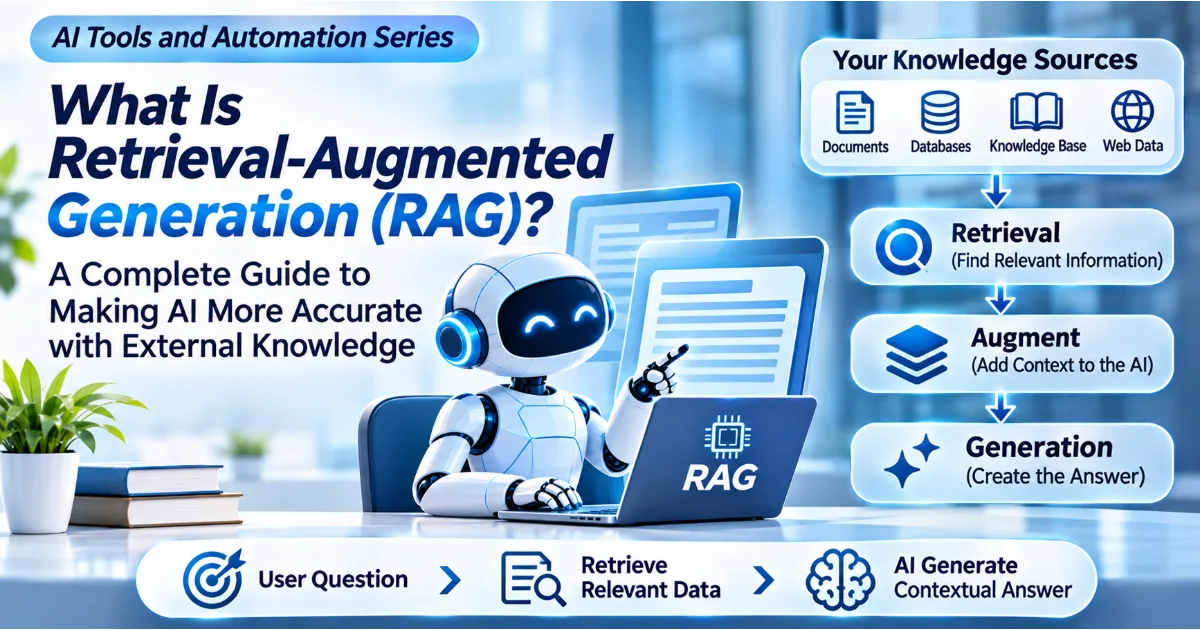
Retrieval-Augmented Generation is an AI architecture that combines an information retrieval system with a generative AI model.
The retrieval component searches an external information source for content relevant to a user's question. The generative component uses the retrieved content, together with the original question, to prepare a response.
The term has three important parts.
Retrieval refers to finding relevant information from a knowledge source. This may include documents, databases, websites, product catalogues, technical manuals, or internal company records.
Augmented means that the retrieved information is added to the context available to the AI model. It gives the model additional information that may not have been included in its original training.
Generation refers to producing a natural language response using the question and the retrieved information.
Consider a company that maintains hundreds of technical support documents.
An employee asks, "How can I reset access to the internal project management application?"
A general language model may provide a common password reset procedure, but that procedure might not match the company's actual security policy.
A RAG system can search the company's approved IT documentation, identify the relevant instructions, and provide those instructions to the language model.
The model then generates an answer based on the retrieved information.
RAG does not guarantee that every answer will be correct. Retrieval may return incomplete or irrelevant information, and the language model may still misunderstand the context. However, a well-designed RAG system can make AI applications more closely connected to reliable, relevant, and current information.
Why Do AI Models Need RAG?
Large Language Models are trained on extensive datasets and can generate useful responses across many subjects. However, their training data does not automatically contain every piece of information a user may need.
There are several reasons why an AI application may require external knowledge.
1. Models May Not Know Private Information
A general AI model does not automatically know the contents of a company's internal documents, customer database, employee handbook, or product management system.
A business may want AI to answer questions using information that is available only within its own organisation.
RAG provides a method for connecting the model with authorised information sources.
2. Information Changes Over Time
Business information changes frequently.
Product prices, service conditions, technical documentation, employee policies, operating procedures, and customer records may be updated regularly.
A model's original training cannot automatically reflect every new change.
A RAG system can retrieve information from updated sources, provided the retrieval index and connected data sources are maintained properly.
3. Users Need Context-Specific Answers
A general response may not be suitable for a particular organisation.
For example, two businesses may have different refund policies, onboarding procedures, and customer support processes.
RAG allows an AI application to retrieve information from the relevant organisation's knowledge base instead of relying entirely on general knowledge.
4. Large Documents Cannot Always Fit into a Prompt
AI models have context limits. Providing an entire collection of documents for every question may be inefficient or impossible.
RAG retrieves selected sections that are relevant to the current request.
This reduces the need to provide the entire knowledge base as input for every interaction.
5. Businesses Need More Traceable Answers
In many business applications, users want to know where an answer came from.
A RAG system can retain references to retrieved documents and provide citations or links to the relevant source material.
This helps users verify information and investigate potential errors.
How Does RAG Work?
A RAG system usually operates through two major stages: preparing the knowledge base and answering user questions.
The first stage is generally completed before users begin asking questions. The second stage occurs whenever a query is submitted.
Stage One: Preparing the Knowledge Base
Before an AI application can retrieve information, its knowledge sources must be organised into a format suitable for searching.
Step 1: Collect Information
The system gathers information from approved sources.
These sources may include PDF documents, Word files, spreadsheets, internal websites, product documentation, knowledge bases, and database records.
The quality of the source information is important because inaccurate or outdated documents can affect the answers generated by the system.
Step 2: Extract Text
The system converts supported documents into machine-readable text.
A PDF containing selectable text can often be processed directly. A scanned document may require Optical Character Recognition to extract its contents.
Additional processing may be necessary to preserve tables, headings, lists, and other document structures.
Step 3: Clean and Organise the Content
Extracted information may contain unnecessary formatting, duplicated content, broken sentences, or irrelevant elements.
The system prepares the information for retrieval.
It may also retain metadata such as document names, dates, categories, access permissions, and section headings.
Step 4: Split Documents into Chunks
Large documents are divided into smaller sections known as chunks.
For example, a 100-page employee handbook may be divided into sections covering leave policies, working hours, benefits, and workplace procedures.
Chunking makes it easier to retrieve only the relevant portions of a document.
The size and structure of chunks matter. Very small chunks may lose important context, while very large chunks may contain unrelated information.
Step 5: Generate Embeddings
The system converts each text chunk into a numerical representation known as an embedding.
An embedding represents information in a mathematical vector space.
Text passages with related meanings may have embeddings that are close to one another according to a selected similarity measure.
For example, a question about resetting an account password may be semantically related to a document section about account recovery, even when the wording is different.
Step 6: Store the Information
The text chunks, embeddings, and associated metadata are stored in a searchable system.
This may be a vector database, a search engine with vector capabilities, or another retrieval infrastructure.
The knowledge base is now ready to support searches.
Stage Two: Answering a User Question
When someone asks a question, the RAG system performs a retrieval and generation process.
Step 1: Receive the Question
A user submits a question through a chatbot, application, internal portal, or other interface.
For example, an employee asks, "How many days of annual leave can I carry forward?"
Step 2: Process the Query
The system prepares the question for retrieval.
Depending on the architecture, it may clean the text, identify important terms, rewrite the question, or generate an embedding.
Step 3: Search the Knowledge Base
The retrieval component searches the indexed information to identify relevant document sections.
It may use semantic similarity, keyword matching, metadata filters, or a combination of methods.
Step 4: Retrieve Relevant Context
The system selects the most relevant chunks and prepares them as context.
For example, it may retrieve the sections of the employee handbook that explain annual leave and carry-forward conditions.
Step 5: Send Context to the AI Model
The original question and retrieved information are provided to the generative AI model.
The system may instruct the model to answer using the supplied context and acknowledge when the available information is insufficient.
Step 6: Generate the Response
The model prepares a natural language answer using the retrieved information.
A well-designed system may also include references to the documents or sections used to prepare the answer.
Step 7: Validate and Present the Result
The application can apply additional checks before displaying the response.
These may include access control, citation validation, formatting checks, or human review.
The user receives an answer that is grounded in information retrieved from the selected knowledge sources.
Understanding Embeddings in RAG
Embeddings are one of the most important technologies behind modern RAG systems.
An embedding converts information into a numerical vector that represents aspects of its meaning.
Traditional keyword search often looks for exact or closely related words.
For example, if a document contains the phrase "account recovery procedure," a keyword search may not find it when a user searches for "How do I regain access to my profile?" unless the relevant terms overlap or the search system includes suitable synonyms.
Semantic search uses embeddings to identify relationships in meaning.
The question about regaining profile access may be close to a document about account recovery, even if the wording is different.
This makes semantic retrieval useful for natural language questions.
However, embeddings do not understand information in the same way humans do. They provide numerical representations that help retrieval systems identify potentially related content.
The quality of retrieval depends on the embedding model, document preparation, chunking strategy, search configuration, and source data.
What Is a Vector Database?
A vector database is a system designed to store and search numerical vectors efficiently.
In RAG applications, text chunks are converted into embeddings and stored alongside relevant metadata.
When a user submits a question, the system creates a query embedding and searches for vectors that are similar to it.
The database returns the associated text chunks and other information required by the application.
Popular technologies used in vector search and retrieval include the following.
1. Pinecone
<Entity value="Pinecone" category="software" disambig="Vector database platform for AI applications"/> provides vector database capabilities for applications that need to store and retrieve embedding-based information.
It can support semantic search and retrieval workflows.
2. Weaviate
<Entity value="Weaviate" category="software" disambig="Vector database for AI-powered search"/> supports vector search and additional retrieval capabilities for AI applications.
It can be used to build searchable knowledge bases.
3. Chroma
<Entity value="Chroma" category="software" disambig="Open-source vector database for AI applications"/> is designed to support embedding storage and retrieval in AI applications.
It is commonly used in development and experimentation.
4. Milvus
<Entity value="Milvus" category="software" disambig="Open-source vector database"/> is designed for large-scale vector search and similarity retrieval.
5. Qdrant
<Entity value="Qdrant" category="software" disambig="Vector search engine and database"/> provides vector search capabilities and metadata filtering for AI applications.
6. PostgreSQL with pgvector
<Entity value="PostgreSQL" category="software" disambig="Open-source relational database system"/> can support vector similarity search through the pgvector extension.
This can be useful for organisations that want to combine relational data and vector retrieval within an existing database environment.
The choice of vector database depends on data volume, search requirements, infrastructure, operational preferences, and integration needs.
Types of Retrieval Used in RAG
RAG systems can retrieve information in different ways. The appropriate method depends on the type of information and the questions users are likely to ask.
1. Keyword-Based Retrieval
Keyword-based retrieval searches for matching words or phrases.
It can be effective when users know the exact terminology used in a document.
For example, a search for a specific policy number or product identifier may work well with keyword matching.
2. Semantic Retrieval
Semantic retrieval uses embeddings to identify information related to the meaning of a question.
It is useful when users express the same concept in different words.
For example, a user may ask how to regain access to an account, while the documentation describes the process as account recovery.
3. Hybrid Retrieval
Hybrid retrieval combines keyword search with semantic search.
This approach can improve results when both exact terminology and conceptual similarity matter.
For example, a technical support question may contain a specific error code as well as a natural language description.
Keyword retrieval can identify the error code, while semantic retrieval can identify relevant explanations.
4. Metadata-Based Retrieval
Metadata filtering narrows the search using information associated with documents.
A system may retrieve only documents from a particular department, date range, product category, or permission group.
This can improve relevance and help enforce access boundaries.
5. Reranking
Reranking evaluates an initial group of retrieved results and reorganises them according to their relevance to the question.
The system may first retrieve several candidate chunks and then use a specialised ranking model to identify the most useful ones.
Reranking can improve the quality of context supplied to the language model.
Different Types and Architectures of RAG
RAG is not limited to one fixed architecture. Systems can be designed with different levels of complexity.
1. Basic RAG
Basic RAG follows a straightforward retrieval and generation process.
Documents are processed, divided into chunks, converted into embeddings, and stored in a searchable database.
When a user submits a question, the system retrieves relevant chunks and supplies them to a language model.
This approach is suitable for many introductory knowledge assistant applications.
2. Advanced RAG
Advanced RAG introduces additional techniques to improve retrieval and response quality.
These may include query rewriting, metadata filtering, hybrid search, reranking, and improved document processing.
For example, a user may submit a vague question. The system can rewrite it into a more specific search query before retrieving relevant information.
3. Modular RAG
Modular RAG uses separate components that can be arranged and improved according to the application.
A system may include independent modules for query processing, retrieval, filtering, reranking, generation, and validation.
This provides greater flexibility when developing complex applications.
4. Agentic RAG
Agentic RAG combines retrieval with agent-based planning and decision-making.
Instead of performing one retrieval operation and immediately generating an answer, the system may decide which information sources to search, whether additional queries are required, and whether the retrieved information is sufficient.
For example, an agentic research assistant may search a knowledge base, identify missing information, perform another retrieval operation, and prepare a consolidated response.
Agentic RAG can be useful for multi-step research and complex knowledge tasks, but it also introduces additional execution complexity.
What Is the Difference Between RAG and Fine-Tuning?
RAG and fine-tuning are two different approaches to adapting AI applications.
RAG connects a model to external information sources and retrieves relevant content when a question is asked.
Fine-tuning modifies a model's behaviour by training it further on a selected dataset.
Consider a company that wants an AI assistant to answer questions about its internal employee handbook.
RAG can retrieve the relevant handbook sections whenever an employee asks a question.
Fine-tuning may help adapt a model to a particular response format, specialised task, or style, depending on the training method and data.
Fine-tuning does not automatically provide reliable access to a frequently changing document collection.
Similarly, RAG does not necessarily change the underlying model's general behaviour.
The two approaches can be used together.
For example, an organisation may fine-tune a model for a particular business task while using RAG to provide access to current internal documentation.
The appropriate choice depends on the problem being solved.
If the primary requirement is access to changing external knowledge, RAG is often a suitable approach.
If the requirement is adapting model behaviour or task performance, fine-tuning may be more relevant.
RAG vs Traditional Search Engines
Traditional search engines identify and present documents or web pages that may contain relevant information.
The user generally reads the results and determines which information answers the question.
RAG uses retrieval as part of a generative AI workflow.
Instead of simply displaying search results, it retrieves relevant information and supplies it to a language model, which generates a response.
Consider searching for an internal leave policy.
A traditional search system may return the employee handbook and relevant policy documents.
A RAG assistant may retrieve the relevant policy sections and explain the carry-forward rules in natural language.
Both approaches can be useful.
Traditional search provides direct access to source documents, while RAG can reduce the effort required to interpret information across multiple sources.
A reliable RAG application should preserve access to original sources so that users can verify important information.
Real-World Applications of RAG
RAG is particularly useful when an AI application needs to answer questions using information that is specialised, private, frequently updated, or distributed across multiple documents.
1. Enterprise Knowledge Assistants
Large organisations maintain extensive internal documentation.
Employees may need information about HR policies, IT procedures, company processes, product documentation, and operational guidelines.
A RAG-powered assistant can search approved internal documents and provide answers based on relevant sections.
For example, an employee may ask how to request access to a particular software application.
The assistant can retrieve the relevant IT procedure and explain the required steps.
2. Customer Support
Businesses maintain product manuals, troubleshooting guides, service policies, and frequently asked questions.
A RAG system can retrieve relevant information when customers ask questions.
For example, a customer may ask whether a particular product supports a specific feature.
The system can retrieve the relevant product documentation and prepare an answer.
Customer support teams can also use RAG to help employees locate information more quickly.
3. Legal Document Research
Legal professionals work with contracts, regulations, policies, case materials, and other documents.
RAG can help retrieve relevant sections and prepare summaries for professional review.
It should not be treated as a substitute for legal research, interpretation, or professional judgement.
4. Healthcare Information Management
Healthcare organisations manage large volumes of medical documentation, administrative procedures, and clinical reference material.
RAG may help authorised users retrieve relevant information from approved sources.
Access controls, privacy safeguards, source validation, and professional oversight are essential.
5. Financial Research
Financial organisations maintain reports, internal policies, research documents, and transaction-related information.
A RAG application can retrieve relevant passages and help prepare summaries.
Financial conclusions and decisions should be verified against reliable data and applicable requirements.
6. Education and Learning Platforms
Educational institutions and learning platforms may use RAG to connect AI assistants with course materials, textbooks, lesson notes, and approved learning resources.
Students can ask questions about a particular lesson and receive responses based on the relevant educational content.
This can make large learning collections easier to navigate.
7. Software Development Documentation
Software teams maintain API documentation, architecture notes, troubleshooting guides, and code-related information.
A RAG assistant can retrieve relevant documentation when developers ask technical questions.
For example, a developer may ask how a particular internal API handles authentication.
The system can search the approved documentation and prepare an explanation.
8. E-Commerce Product Information
Online stores maintain product descriptions, specifications, compatibility details, delivery conditions, and return policies.
A RAG assistant can retrieve the information relevant to a customer's question.
For example, a customer may ask which product supports a particular requirement.
The system can search product documentation and explain the relevant options.
Availability and pricing should be retrieved from current business systems rather than assumed from older documents.
9. Human Resources
HR teams maintain employee handbooks, benefit information, onboarding guides, and workplace policies.
A RAG assistant can help employees find relevant information without searching through multiple documents manually.
For example, an employee may ask about parental leave or reimbursement procedures.
The assistant can retrieve the relevant policy sections and explain the process.
10. Research and Knowledge Discovery
Researchers work with papers, reports, publications, and other information sources.
RAG can help retrieve relevant passages, compare information, and prepare summaries.
Researchers should verify references and ensure that conclusions accurately reflect the source material.
Practical Example: Building a Company Knowledge Assistant with RAG
Consider a small software company that wants to create an AI assistant for employees.
The organisation has several types of internal documentation, including employee policies, product guides, IT procedures, and project documentation.
Employees currently search through folders and documents whenever they need information.
The company wants a system that can answer questions using these internal sources.
Step 1: Identify the Knowledge Sources
The company collects approved documents from its internal knowledge repository.
It identifies which documents are suitable for retrieval and which contain sensitive information that requires restricted access.
Step 2: Extract and Process the Documents
The system extracts text from the documents.
Scanned documents are processed using OCR where necessary.
The extracted content is cleaned and organised.
Step 3: Divide the Content into Chunks
The documents are divided into meaningful sections.
Headings and metadata are retained so that the retrieval system can identify the context of each section.
Step 4: Generate Embeddings
An embedding model converts each chunk into a numerical representation.
These embeddings are stored with their associated document information.
Step 5: Build the Retrieval System
A vector database or compatible search platform is configured to retrieve relevant information.
The system may also apply metadata filters based on document category and employee permissions.
Step 6: Connect a Language Model
A language model is integrated into the application.
The model receives the user's question and the information retrieved by the search component.
Step 7: Create the User Interface
Employees access the assistant through an internal application or website.
They can ask questions in natural language.
Step 8: Add Source References
The system provides references to the documents used to prepare an answer.
Employees can open the original documents to verify important details.
Step 9: Test the Application
The company tests common questions, ambiguous requests, missing information, outdated documents, and restricted content.
It checks whether the system retrieves the correct information and respects access permissions.
Step 10: Maintain the Knowledge Base
When a policy or document changes, the knowledge base must be updated.
The system should also remove or replace outdated information when appropriate.
This example demonstrates how RAG can turn an ordinary document collection into a searchable AI-powered knowledge assistant.
How to Build Your First RAG Application
Beginners can understand RAG by building a small application using a limited collection of documents.
A practical starting project is a question-answering assistant for a collection of PDF files.
Step 1: Select a Small Knowledge Base
Choose a few documents that contain related information.
For example, use product manuals, course notes, or internal process documentation that you are authorised to process.
Step 2: Extract the Text
Use a document processing library or service to extract text.
If the documents are scanned, use OCR.
Step 3: Split the Text into Chunks
Divide the content into smaller sections while preserving meaningful context.
Avoid splitting information in ways that separate important definitions from their explanations.
Step 4: Generate Embeddings
Select an embedding model and convert the chunks into vectors.
Step 5: Store the Embeddings
Use a vector database or compatible retrieval system to store the vectors and associated metadata.
Step 6: Create a Search Function
Convert the user's question into an embedding and retrieve the most relevant document chunks.
Step 7: Connect a Language Model
Send the question and retrieved information to a generative model.
Use clear instructions that explain how the model should respond when the available information is insufficient.
Step 8: Display the Answer
Create a simple interface where users can ask questions and receive responses.
Include source references wherever possible.
Step 9: Evaluate Retrieval Quality
Prepare test questions with known answers.
Check whether the system retrieves the correct document sections.
Step 10: Improve the Application
Adjust chunk size, retrieval settings, metadata, and prompts based on the test results.
Start with a small application and expand only after the retrieval process works reliably.
Important Challenges and Limitations of RAG
RAG can improve access to external information, but it does not eliminate every limitation of generative AI.
1. Poor Document Quality
If the source documents contain incorrect, outdated, or incomplete information, the system may retrieve that information and produce an incorrect answer.
The quality of the knowledge base is therefore fundamental.
2. Incorrect Retrieval
A retrieval system may return documents that are related to the question but do not directly answer it.
If the wrong context is supplied to the model, the generated answer may be misleading.
3. Poor Chunking
Documents divided into unsuitable sections may lose important context.
A policy section may be separated from its exceptions, or a technical explanation may be separated from the definition it depends on.
Chunking should preserve meaningful information.
4. Hallucinations
Even when relevant documents are retrieved, a language model may generate unsupported statements.
RAG reduces dependence on the model's internal knowledge for the specific question, but it does not guarantee factual accuracy.
5. Outdated Information
A knowledge base may contain old documents or fail to reflect recent updates.
Businesses need processes for updating, replacing, and removing information.
6. Access Control Problems
A retrieval system may expose information that a particular user is not authorised to access.
Access permissions should be enforced during retrieval, not simply assumed after an answer has been generated.
7. Data Privacy and Security
RAG applications may process sensitive internal documents, customer records, or personal information.
Organisations must evaluate how data is stored, transmitted, and shared with external services.
8. Retrieval Performance
Large knowledge bases may require significant indexing and search infrastructure.
Search quality and response speed depend on data volume, retrieval configuration, and system architecture.
9. Cost
A RAG application may involve document processing, embedding generation, vector storage, retrieval operations, and language model requests.
The total cost depends on usage, infrastructure, model selection, and maintenance.
10. Difficult Evaluation
A system may produce a fluent answer even when it retrieves the wrong information.
Evaluation should therefore examine both retrieval quality and final answer quality.
Best Practices for Building Reliable RAG Systems
A successful RAG application requires more than connecting a vector database to a language model.
Begin with reliable and authorised information sources.
Remove duplicated and outdated documents where possible.
Use document processing methods that preserve headings, tables, and important relationships.
Choose a chunking strategy that matches the structure of the content.
Evaluate embedding models and retrieval methods using representative questions.
Consider hybrid search when exact terminology and semantic meaning are both important.
Use metadata filtering and permission checks to ensure that users retrieve only information they are authorised to access.
Provide clear instructions to the language model about how to use retrieved information and what to do when the information is insufficient.
Retain source references so that users can verify important answers.
Test the system using questions with known answers and review cases where retrieval fails.
Monitor the knowledge base as documents change.
Finally, treat RAG as a complete information retrieval and generation system rather than assuming that a model will become accurate simply because documents have been connected to it.
How to Evaluate a RAG System
RAG systems should be evaluated across several stages.
Retrieval relevance: Does the system retrieve information that is actually related to the question?
Retrieval accuracy: Does the retrieved content contain the information needed to answer the question?
Answer correctness: Does the generated response accurately reflect the retrieved information?
Groundedness: Are the claims in the response supported by the available context?
Citation quality: Do the references point to the documents or passages that support the answer?
Response completeness: Does the answer address the user's question without omitting important conditions?
Response speed: How long does the system take to retrieve information and generate a response?
Cost per query: How much does each interaction cost when retrieval, model usage, and infrastructure are considered?
Permission compliance: Does the system prevent users from retrieving information they are not authorised to access?
User satisfaction: Do users find the answers useful, clear, and trustworthy?
Evaluating retrieval separately from generation is important. A language model cannot reliably answer a question using information that the retrieval system never found.
The Future of RAG
RAG is likely to remain an important approach for connecting generative AI with external information.
One direction is the development of more advanced retrieval methods. Systems may become better at understanding complex questions, combining keyword and semantic search, and identifying the most useful information from large knowledge collections.
Another direction is multimodal retrieval. Instead of searching only text, future systems may retrieve relevant information from images, diagrams, audio, video, and other data formats.
Graph-based retrieval may also become more important. Knowledge graphs can represent relationships between people, products, events, documents, and other entities. Combining these relationships with retrieval may help systems answer questions that require connecting information across several sources.
Agentic RAG is another developing area. AI agents may decide which knowledge sources to search, identify missing information, perform additional retrieval operations, and evaluate whether the available evidence is sufficient.
Businesses may also use more specialised RAG architectures for different departments and applications.
For example, customer support may use a knowledge base containing product documentation, while HR may use a separate collection of employee policies with different access permissions.
Data governance will remain important as organisations connect more internal information to AI systems.
The future of RAG will depend not only on better language models but also on improved data quality, retrieval accuracy, security, evaluation, and integration with existing business applications.
Conclusion: RAG Connects Generative AI with Real-World Knowledge
Retrieval-Augmented Generation is an important approach for building AI applications that can use external information when answering questions.
It combines document retrieval, embeddings, search infrastructure, and generative AI to provide responses based on relevant information from a selected knowledge source.
Instead of relying only on what a language model learned during training, a RAG system can retrieve information from documents, databases, and other connected sources at the time a question is asked.
This makes it useful for enterprise knowledge assistants, customer support, research, education, document management, software development, and many other applications.
However, RAG does not automatically guarantee accurate answers. Its effectiveness depends on reliable source documents, appropriate chunking, effective retrieval, secure access controls, and careful evaluation of generated responses.
For beginners, the best way to understand RAG is to build a small question-answering application using a limited collection of documents.
Start with a few reliable files, create a searchable knowledge base, connect a language model, and test whether the system can retrieve and explain the correct information.
As businesses continue adopting generative AI, the ability to connect AI models with relevant, current, and authorised knowledge will become increasingly valuable.
RAG helps bridge the gap between general-purpose AI capabilities and the specialised information that people and organisations need to work effectively.
Continue the Discussion
If you could build an AI assistant using your own documents and knowledge base, what would you use it for?
Would you create a customer support assistant, an internal company knowledge assistant, an educational tutor, or a research assistant?
Share your thoughts and experiences as we continue exploring AI tools and automation.
#RAG #RetrievalAugmentedGeneration #GenerativeAI #ArtificialIntelligence #AITools